In the end, I had to throw all the spices out — no takers for half-used, decade-old containers of parsley flakes or jars of cumin — but I’ll always remember cleaning out that drawer and all of the memories it stirred up.
I wear earbuds to sleep. I never thought I would be that person, but here we are.
I specifically wear the Soundcore Sleep A20 earbuds. They’re designed to be worn while sleeping and do a great job of staying in my ears while my head is on the pillow—a feat I’ve never found AirPods capable of. There’s a newer model, the Soundcore Sleep A30, but Wirecutter still recommends the A20 over the A30.
I use them to pipe white noise directly into my ears so that, on mornings when other members of my family have to get up really early, I can try to stay asleep a little longer.
⤢It’s not beautiful, but it’s functional. Like me.
On mornings when I have to wake up early, though, I need to set an alarm. I’ve become so accustomed to sleeping with these things in my ears that I wear them even on nights when I’ll need to get up early. But the alarm I set on my iPhone doesn’t ring through the earbuds. It plays through the phone’s speaker, awakening my wife on mornings when she gets to sleep in.
That’s no good.
There’s no setting I can find in iOS that lets you send an alarm exclusively to Bluetooth-connected earbuds instead of through the iPhone’s speaker. But there are third-party apps that do exactly that.
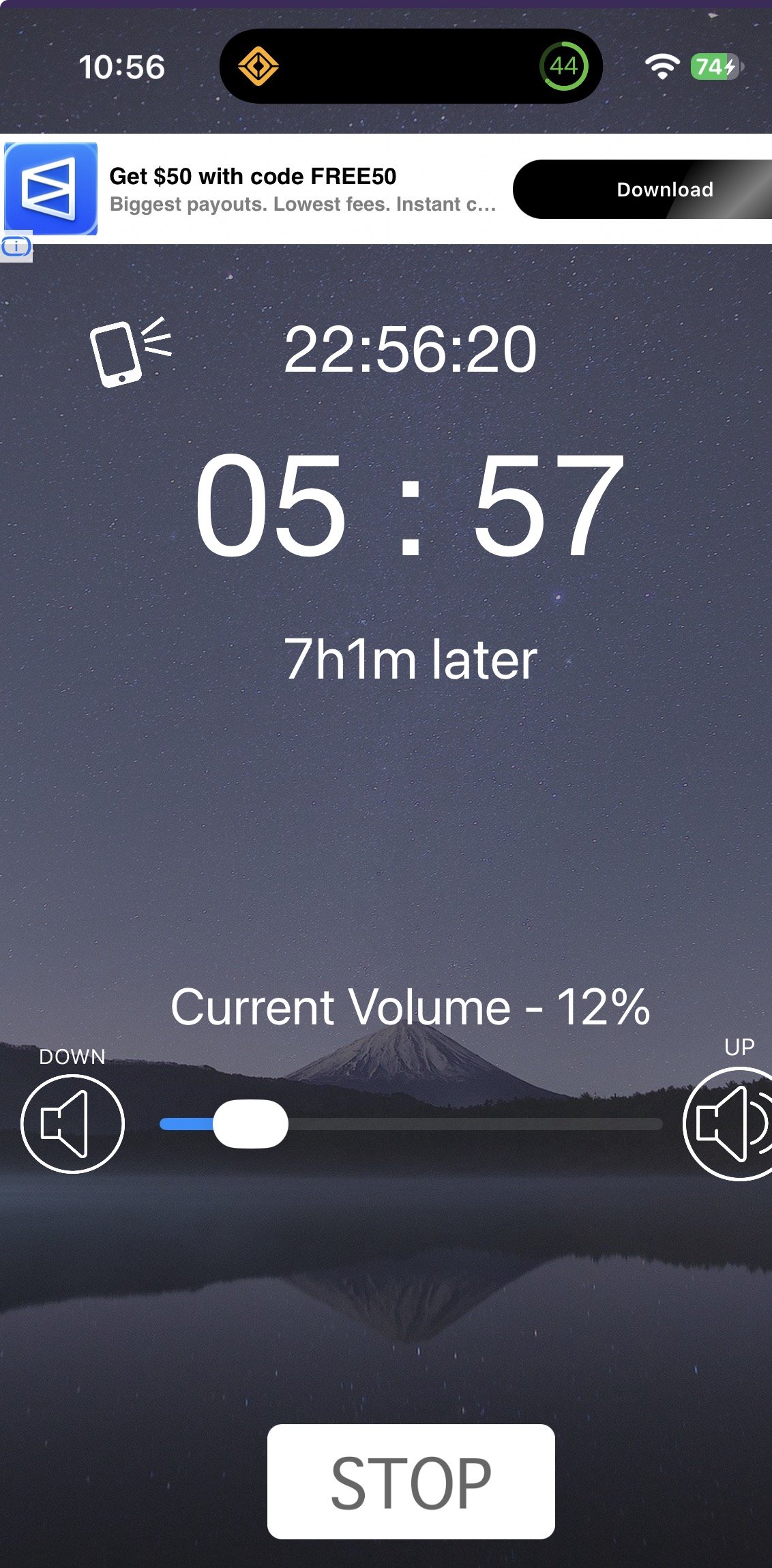
I found one that works called Headphone Alarm. The interface is nothing to write home about, and I cropped my screenshot so you couldn’t see the bottom banner ad with its gratuitous nudity. But the app does what I need: It plays my morning alarm directly into my ears.
I’m a nervous person when it comes to waking up on time. So I tend to set one alarm in Headphone Alarm and a backup alarm on my iPhone for five minutes later. The app wakes me up, and then I turn off the backup before it rings.
My wife is still sleeping, and I’m awake. It’s a dream come true.
The classic iOS game of world domination is all-new — and also extremely familiar
I’m now the very proud developer and owner of Strategery, the classic iOS game. I just released a brand new version of the app, available now in the App Store. You should absolutely check it out. But I’d love to tell you the backstory.
Playing the game
In 2009, I found Strategery in the App Store. I don’t remember exactly how I stumbled across it, but I know that I spent a lot of time exploring the App Store in those days, because it still felt like you could kind of see everything if you spent enough time. There were many apps, but still, you could sort of count them.
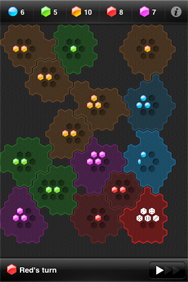
I recognized Strategery as a sort-of Risk-like game — though I’d never actually played Risk. I thought the name was funny (pulled from Will Ferrell as George W. Bush on Saturday Night Live). And the gameplay was straightforward, fun as heck, and rather addictive: Attack colorful amorphous regions, subject to the whim of dice roll coupled with your gameplay strategy, win or lose, play again.
On your turn, you tap any country you control that has at least two armies, and then tap an adjacent nation you wish to attack. Each army involved counts as one die, and if the sum of all the dice your armies roll is greater than the sum of your enemies — well, get ready to plunder. You’ll immediately take ownership of their land … but if the final dice score was close, expect to lose some armies in the process.
That review got Fireballed. Strategery got hugely popular.
In 2009, Macworld named the app Best Strategy Game. In my writeup for that award, I said, “There is no game I play on my iPhone more than Strategery” — a quote that ended up on the game’s App Store page, which I found exquisitely exciting. I also wrote:
Simple on the surface, Strategery offers depth that can — and will — claim hours of your time.
How the game began
Original developers Sumul Shah and Courtland Idstrom met in college in 1999. Their first app was Top Shelf (née iDrink), which was a cocktail reference tool that hit Apple’s Top 100 chart. With their friend Peter Ju freelancing for them, they built and launched Strategery in 2009.
The game offered local multiplayer at the start, and eventually added online multiplayer too. At one point, there was a standalone Lite version — the App Store was a different beast in those days.
The last Strategery update in the App Store was version 3.8, released June 2017. It had been a two year gap since its prior update, which came two years after that prior update.
Strategery was a hit, but its co-creators eventually moved on. Shah ran a design studio with his wife for nearly a decade, and later founded (and led design for) a medical technology company. Idstrom went to work at Apple back in 2018 and has been there since.
But the darn thing kept working. It’s been working with no further updates since 2017. That’s bonkers.
99 percent inspiration
In August of this year, Jim Ray posted on Mastodon:
I had noted the same thing — that Strategery had stopped working on iOS 27 betas. It made me sad.
As Jim noted, wow was the app a great investment back in the day; you paid a buck or three (depending on when you got it), and got as many as seventeen years of enjoyment out of it. That’s crazy.
But I was still sad to let it go. Strategery is a great game, a great time-passer when lines are long or planes are delayed.
I decided I’d try to build my own version.
I got my app — which I first called “Averse,” as in “Risk Averse,” and later called “Skirmish,” when friends told me “Skirmishish” was terrible — to a pretty good place. But I immediately concluded I wasn’t comfortable sharing the app with anyone but a few friends on TestFlight.
(Legally, you can’t copyright game mechanics. So I could have released the app under a different name as my own thing. It’s why so many knockoff games exist. But my concern wasn’t a legal one.)
I loved Strategery. I didn’t feel good about knocking it off. So I reached out to the developers.
Or I tried to. The old email addresses I had from some correspondence in 2010 didn’t work anymore. I did some Internet stalking and found the developers. And then when I found a web game Shah had made — Figure — it had an email address. I made contact.
I had several delightful video conversations with Sumul and Courtland. And I lucked out: I found two of the nicest developers you could ever hope to meet. They still felt a ton of love for Strategery, they loved how many people still felt warmly about the game — but they didn’t have time to devote to keeping it updated. We worked out a deal for me to take it on.
With great power comes great responsibility
I’m lucky. In addition to taking over the app, I also get a direct line to insights from Courtland and Sumul. They pointed out features I’d missed in my recreation, explained why some things worked the way they did, and suggested and talked through various feature ideas. The new Strategery is the same game but also clearly a different game.
And I’m inspired by Jim’s Mastodon post — and the two co-creators. We all agreed that the nicest thing to do was update the app in place, so folks who already owned it, still owned it. If you bought it eons ago for $2, you get the new version today. (If you’re overcome with the need to spend money on Strategery anew, I did add a tip jar.)
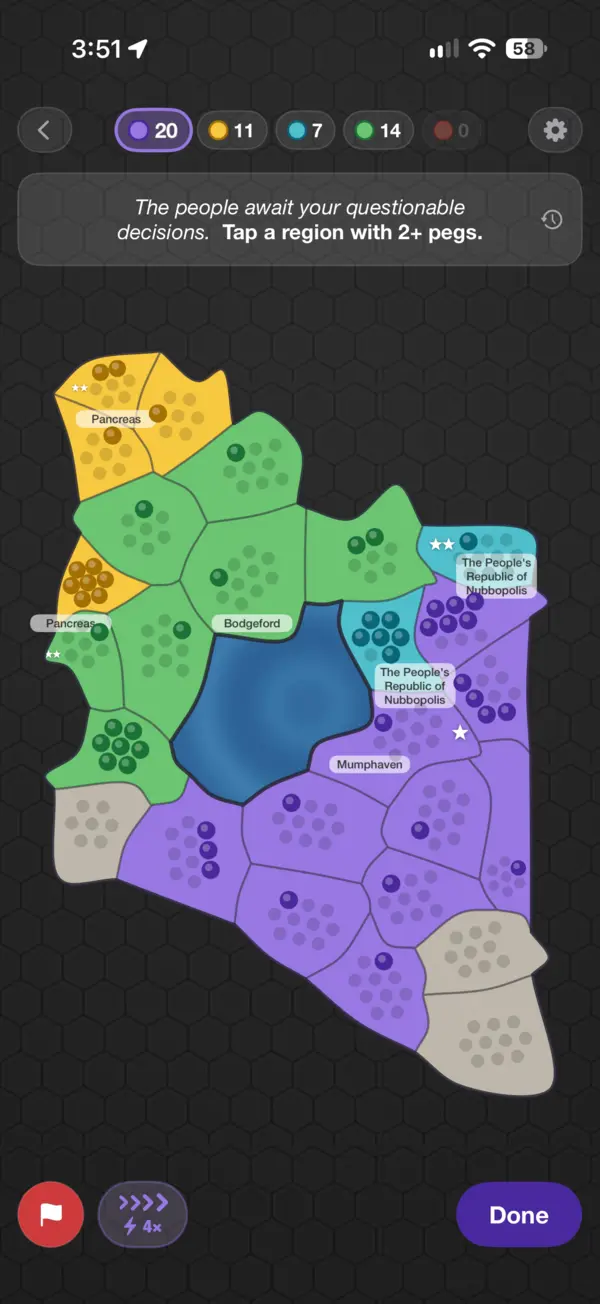
The new version of the game should be recognizably Strategery to anyone who remembers the original version. But I also aimed to add some Lexisms.
There’s some whimsy throughout, in the algorithmically-generated country names, the snarky play by play, and the overall language used by the game. And I added Chaos Mode, where taking over certain regions triggers a roulette wheel that causes mostly good things to happen (extra pegs, a new region), and sometimes instead, you know, takeths away.
Newcomers can buy the app outright for $5. (Inflation is the worst. Sorry.) But existing owners get Strategery 4.0 for free. May the blobs be ever in your favor.
Martin Höller builds apps for people with busy minds. The most popular one works by refusing to let you ignore it.
Höller is originally from Graz, Austria, spent eight years in Berlin, and has lived in Florence since 2022. He’s been building for Apple’s platforms since 2006, and he still does freelance iOS and Mac work for clients when he isn’t working on his own stuff. His own stuff ships under the name Blue Banana Software, which is Höller plus two collaborators: Teresa Brancaccio handles communication and Simone Jahrmann edits. The company’s stated mission is apps that support focus and daily rhythm, designed with neurodivergent needs in mind. Höller says that comes from lived experience: The site notes that his own light ADHD and dyslexia shape how he builds.
Höller’s app that gets the most attention is In Your Face, which is fitting, since attention is the whole product.
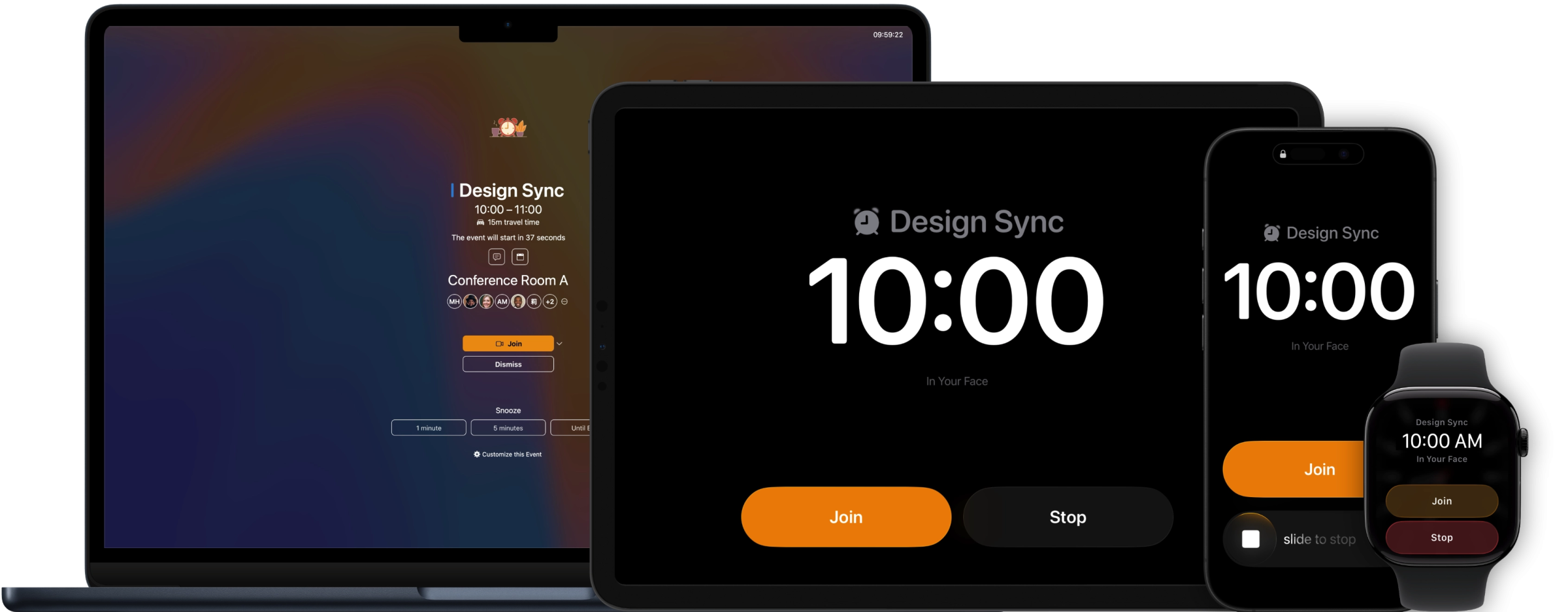
It’s a meeting reminder utility. Shortly before an event on your calendar, In Your Face takes over your entire screen. You get the name of the meeting, a countdown, a big Join button, and a Dismiss button. You can snooze for a minute, or five, or until the event starts. What you can’t do is not see it. It lives up to the name. It is most decidedly In Your Face.
The origin story is short. Höller had a coworker who was always late to meetings, because he’d get so deep in his work that the calendar notification came and went without him noticing. At a company outing, after more than one beer, Höller told him he needed a reminder “in your face,” and said he’d build one for him. Then he did.
Höller pitches the app to people with ADHD, hyperfocus, and time blindness, and judging by the App Store reviews, that audience has found it. But the target market also includes anyone who has looked up from a task and realized their next meeting started four minutes ago. If you were mid-thought when Notification Center politely reminded you about your next call or meeting, you could easily miss it. In Your Face eliminates that problem.
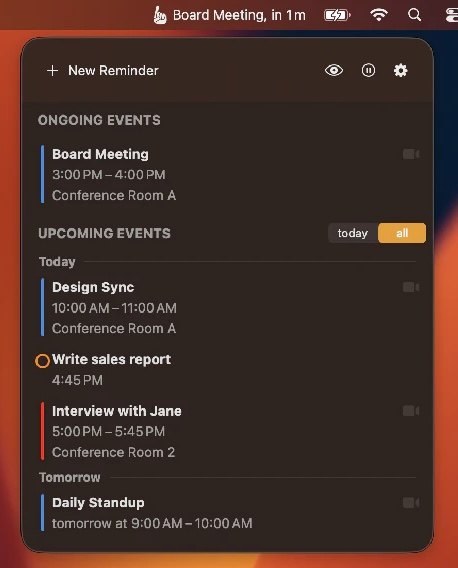
The details are good, too. The app lives in the menu bar, where you can see what’s happening now and what’s next. It finds the video link in a calendar invite (it knows about more than 60 conferencing services) and joins the call with one click. It can move the alert earlier to account for travel time when the meeting is somewhere you physically need to be. There are custom reminders for things that aren’t on your calendar, themes for the alert screen, calendar filters, and desktop widgets. It runs on Mac, iPhone, iPad, and Apple Watch, and there’s a Windows version, too.
In Your Face is $3.99 a month or $24.99 a year. If you’d rather own it, the direct-download Mac version has a $69 one-time license, and the app is on Setapp as well. Höller says it has surpassed 100,000 downloads.
The rest of the bunch
That same idea, building for people whose minds are busy, runs through everything else Blue Banana ships:
Chimeful is a Mac menu bar app that plays gentle chimes when it’s time to take a break, drink some water, stretch, or rest your eyes. If In Your Face is the loud one, this is the quiet one.
Tracktiq is time tracking for freelancers and consultants on the Mac, covering hours, revenue, and payments. As a fellow consultant, I understand the need.
wrdlr is a word finder for patterns and puzzles, on Mac and iPhone. Given how I spend my days, I’ve decided not to think too hard about whether that counts as cheating.
World of Noms is an iPhone app for browsing iconic dishes from around the world and jumping straight to a recipe. Höller lists food among his hobbies, and it shows.
Noomba helps you practice numbers in foreign languages, across several learning modes. Numbers are the part of a new language that falls apart the moment someone says a price quickly.
Then there are the music apps. Pocket Jam loops sections of any song and changes pitch and tempo independently, so you can slow down a solo, or drop a track into your tuning without reaching for a capo. Piano Tabs does something similar for MIDI files, showing you the notes on a keyboard with looping and a speed trainer, and it comes with more than 800 pieces built in. I’ve been beta testing some new versions of these, and the care Höller and his team put into their apps is clear, even in prerelease builds.
I wrestled with that sentence, but I think it’s right. Apps tend to get more complicated over time, because adding features is easy and removing is scary, and tends to alienate at least some users, since every feature has a fan.
Greg’s apps — Quiche Browser and Quiche Reader, both from his one-person shop Quiche Industries — go the other direction. They’re minimalist, but not lacking in features. They’re minimalist in that Greg thought hard about what users actually need, and then put those features exactly where you’d look for them.
Greg is French, lives in Tokyo, and spent five years as a web and UX engineer at Google before leaving what he calls “a comfy job” to build products that line up with his values. (He later did stints at Appier, Beam, and iA, the folks behind iA Writer.) His personal site lists four principles: simplicity over complexity, obsess over the details, respect platform conventions, and encourage mindful digital consumption. Many developers don’t even spend time thinking about these sorts of design principles. Greg does, and his apps embody them.
Quiche Browser
Quiche Browser launched in July 2023. Greg says it’s been downloaded more than 75,000 times, it carries a 4.9-star rating in the App Store, and it got Fireballed this past March, when John Gruber called it “a very robust, exquisitely designed, stunningly handsome web browser.” John said that after running Quiche Browser as his default, deciding whether to go back to Safari was “a remarkably close call.”
You may know that Apple’s policies (at least in the US) require that browsers use Apple’s WebKit engine under the hood. Quiche is no exception. What Greg built from scratch is everything around the web page. That’s the part you interact with.
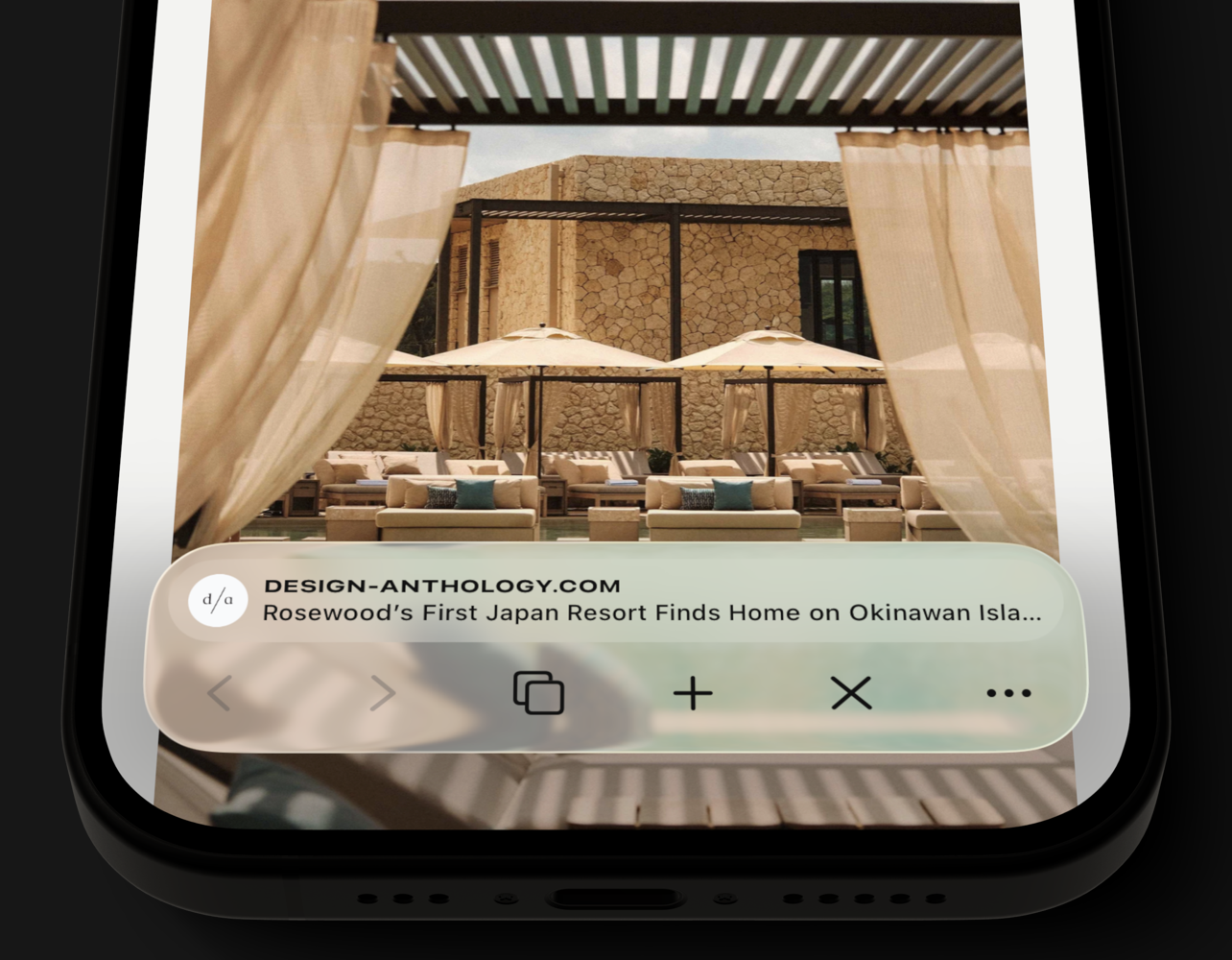
The pitch is customization, but a very particular kind. You choose which buttons live in the toolbar and where they go. The stuff you use less often goes in a popover menu, which you can also arrange. The address bar can show the domain, the page title, the site’s favicon, an estimated read time — or you can switch it off entirely and browse with nothing but the page and a couple of buttons. If you’d rather not fiddle, there’s a list of ready-made toolbars to start from.
The risk is that an app of this sort feels like settings overload. Quiche doesn’t. The Verge called it “somehow both incredibly simple and one of the most customizable browsers I’ve ever tried.”
Then there are the little things, which in this app aren’t little at all:
Ads, trackers, and cookie banners are blocked out of the box.
A one-tap JS button in the toolbar turns JavaScript off for whatever site you’re looking at.
You can use any search engine you want, including Kagi, and turn off the AI features on Google, DuckDuckGo, Bing, and Brave results.
Tabs can be a list or a grid, sorted by how recently you opened them, by read time, or grouped by site.
The toolbar comes in Liquid Glass or Classic, in case you’ve had enough Liquid Glass for one lifetime.
Privacy-wise: no sign-up, no telemetry, no analytics, and the app never talks to any server (outside of the sites you’re browsing) except RevenueCat, to handle purchases.
Quiche Browser is free. Quiche PLUS, at $3.99 a month or $29.99 a year, unlocks website darkening (a proper dark mode for every site), Comfort Mode (which pulls tabs, favorites, and search suggestions down to where your thumb already is), and the extra app icons and button styles. Greg is upfront that building a browser alone is a full-time job and that PLUS is what pays for it. There’s no investor, no search engine deal, and no data monetization in the mix. The iPad version is in beta, and a Mac version is on the wish list — his and mine.
Quiche Reader solves the problem that every read-it-later app eventually creates: the painfully long list that leaves you feeling like you’ve let yourself down. And maybe the writers whose articles you’ve deferred, too.
You know the list. You’ve been saving articles to it since 2018. It has 900 items in it. You open it, scroll for a bit, feel bad, and go look at Instagram instead. It’s not unlike flicking through a bunch of Netflix shows and then turning off the TV.
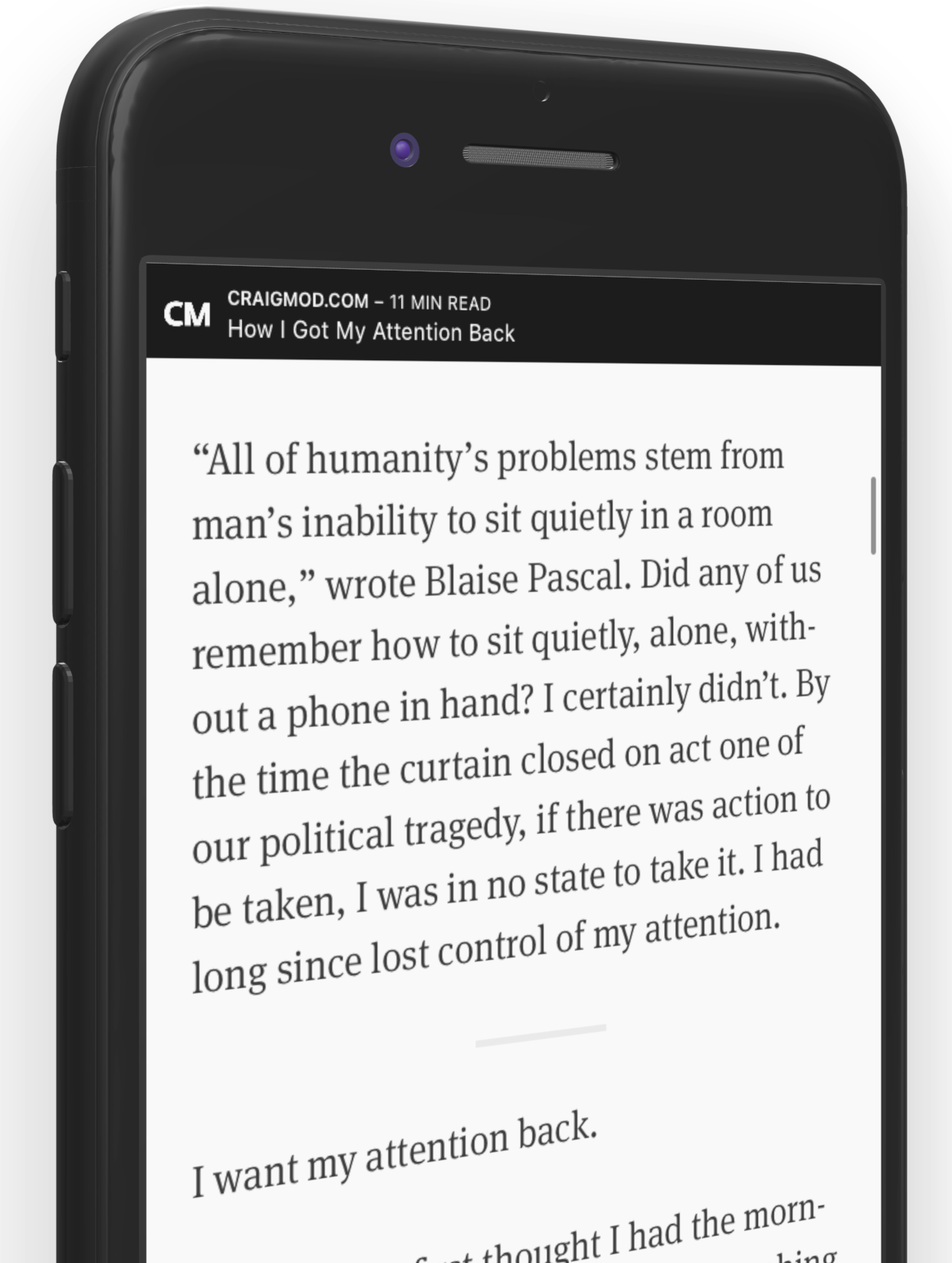
Quiche Reader doesn’t show you the list. It shows you one article. The oldest one, in fact, on the theory that the newest thing you saved isn’t necessarily the best thing you saved; it’s just the most recent. You read it, archive it, or delete it, and only then do you get the next one. You can snooze an article to push it to the back of the queue, but only three times, after which the app would like you to make a decision, please. It also nudges you to let go of anything you haven’t read in 30 days.
It’s not exactly a read-it-later app. It’s a read-it-later-or-don’t app. Choices must be made.
Saving works from any app on iPhone, iPad, and Mac, and there are extensions for Safari, Firefox, and Chrome. Swipe to archive and the next article appears instantly. Everything lives in your own iCloud storage. There’s no account, there’s no tracking, and it’s free, with no in-app purchases at all.
The common thread
What I love about Greg’s apps is that they’re opinionated without being challenging. They exude tremendous polish and thoughtfulness. Quiche Browser gives you a hundred choices about your toolbar because the toolbar is the thing you touch constantly. Quiche Reader gives you almost no choices at all because choosing was the whole problem. It’s the same philosophy, executed in opposite ways.
Neither app leaves you feeling like something’s missing. They leave you feeling like somebody thought about it.
Puzzling Snapshots is a puzzle app full of great photography. That’s not surprising once you know who made it: developer Mark Courtney is a professional photographer. All 250 photos in the app are his — flowers, scenery, travel, wildlife — and it’s clear he knows his way around a camera. (He knows his F-stops, full stop.)
Pick a photo, pick a puzzle type, and start solving. There are four puzzle options: Classic (scattered pieces you connect however you like), Drop (pieces fall into place from above), Slide (the classic sliding-tile puzzle with one open gap), and Swap (trade two adjacent pieces at a time). No timers, no scores, no streaks.
The puzzles can be hard. I love slider puzzles, and I’ll confess that I like to simplify them in the app down to nine squares, because that’s what suits my brain best. Happily, Puzzling Snapshots lets you set the piece count globally, per puzzle type, or even for the specific puzzle you’re in the middle of — and you can turn on a full-sized guide image behind the pieces when you want a little help. Or a lot of help. No judgment.
Your progress saves automatically and syncs between iPhone and iPad. The app costs $5.99, with no in-app purchases and no subscription. If you’ve got a few minutes of downtime and would rather not wade into your inbox or into the world of (ugh) social media, Puzzling Snapshots offers a fun few moments of iOS zen.
My preferred RSS syncing tool can also make my feeds better. That’s cool.
I love RSS, and the rise and fall of Google Reader had nothing to do with it; I was never a user. I’ve long loved NetNewsWire, and while I dabbled with Reeder on iOS at some points in the past, I’m now NetNewsWire on my Mac, iPhone, and iPad. I’ve been a heavy RSS feed reader for years, and it’s only gotten more important to me since launching Lex On Tech; if there are interesting tech stories, I want to be sure I see them, so that I can link to them.
I use Feedbin as my RSS syncing tool. It ensures that my Mac, iPhone, and iPad are all in sync; articles I’ve read on one device don’t show up as unread on another. That’s just the way I like it.
But Feedbin isn’t “just” an RSS syncing tool. It offers several power user features under the hood.
Stop the madness
Though I love my RSS feed for gathering a slew of articles across topics I care about — Apple and other tech, the Philadelphia Eagles, entertainment news, essays from writers I admire, weird posts from the band They Might Be Giants… some posts make me crazy.
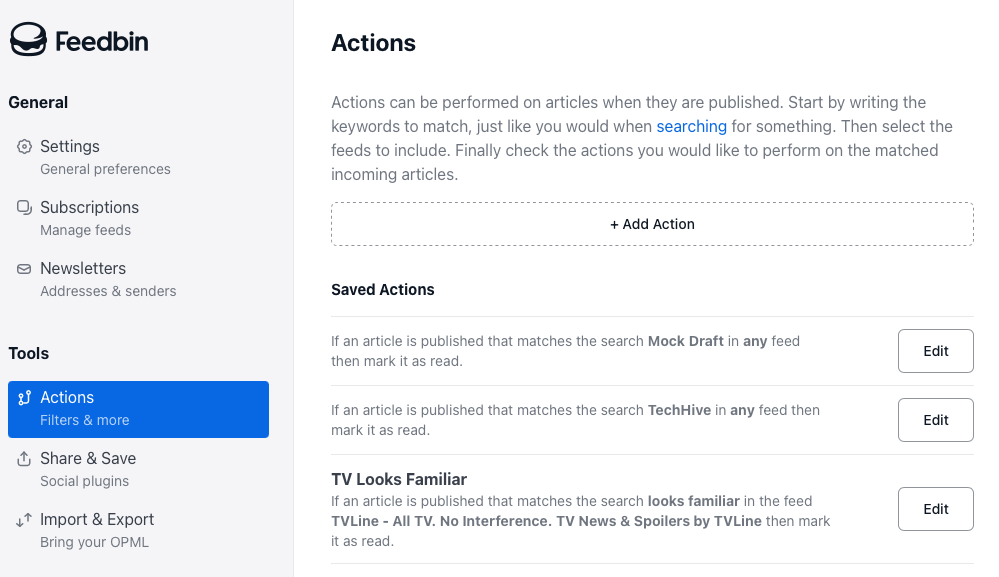
I enjoy my NFL fandom feeds during the season. But I have never once cared about a mock draft. Seeing those posts annoys me. And thanks to Feedbin, I don’t have to.
Through its web app, I can configure filters that automatically mark posts as read, so they never request my attention. You can set filters across all your feeds, on categories of feeds, or on individual ones. I truly delight in not seeing posts that annoy me and limiting my feed to the stories I actually want to read. The tools (labeled Actions in Feedbin’s interface) are robust and clever — and intuitive to use. I’m a big fan.
Clean up on aisle five
People stop writing on their blogs. It happens.
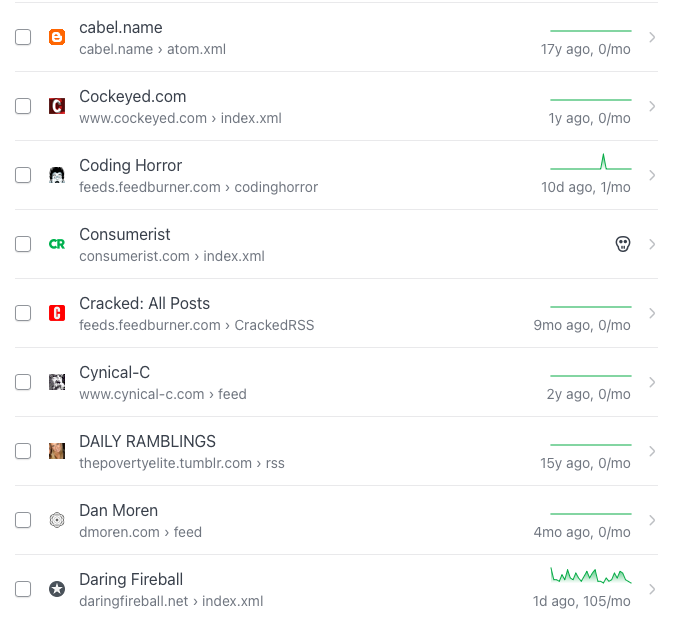
Your RSS reader can end up overstuffed with dead feeds. Feedbin helps clean up the mess. The Subscriptions tab lists all your feeds, with icons indicating which ones are completely dead, and flatlines indicating ones that have gone silent for years on end.
There are some I’ll keep in there just in case the writer ever starts publishing again. But removing some dead weight feels good.
Even better, though, Feedbin offers an option to repair some broken feeds. The Repair Feed button helped me resurrect a feed that hadn’t published updates since 2022 on the old URL, but in fact steadily publishes on a newer feed I knew nothing about. That’s great.
You can filter to dead feeds and fixable ones, removing cruft and resurfacing others.
The letter of the law
Finally, Feedbin offers ways you can get your email newsletters directly as pseudo-RSS feeds. It’s clever. You subscribe to your newsletters with a custom Feedbin address that’s unique to you, and they’re now one fewer thing clogging up your inbox — while appearing in your newsreader app.
None of these Feedbin features are new, but I’d forgotten they were there. Spending a little time in the web interface has vastly improved my RSS consumption.