Notification Center banners appear smack dab across the screen on an iPhone, and dead center on your iPad, but tuck away in the top right corner of your Mac’s display. I use a gigantic, three-foot wide monitor. I’d prefer my notifications appear in the center on my Mac display, too. Thanks to the open source app PingPlace, they can.
I don’t love that notifications are shoved into that corner on my Mac for a few reasons, and a big one is my ongoing obsession with alerts. (There are great arguments for turning more of those notifications off, but I am unswayed: I appreciate that I have a reputation for responding quickly, and notifications help me do that.)
I do a lot of video calls. And if I’m on Zoom and an alert arrives, my eyes dart to the upper right corner of my display. It’s a sickness, but I have the disease, and I consider it incurable. But it’s also obvious to everyone I’m on the Zoom with that I just glanced at an alert.
With PingPlace, the alert can drop down directly on the top center of my screen, right under where my webcam is, and no one has to know I just enjoyed the dopamine hit of reading a fresh alert.
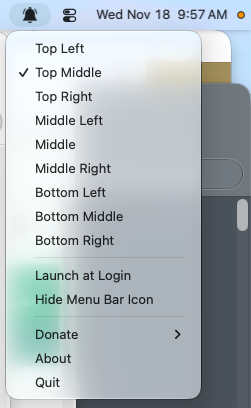
In fact, PingPlace gives you a lot of customization over where those Notification Center alerts appear: They can be left, middle, or right horizontally, and top, middle, or bottom vertically.
The app requires Accessibility permissions, and because it’s unsigned, I had to give the app permission to run on my Mac in Settings -> Privacy & Security. But you can read its actual code on GitHub to reassure yourself that it doesn’t do anything untoward.
I also saw an enhanced version of the app called PingPlaceEx on GitHub; that one gives finer control for setups with multiple monitors, but I didn’t test it.