LexonTech

Tech, mostly Apple, from Lex Friedman.

MembershipEnjoying Lex on Tech? Membership keeps it going, and gets you extras.Become a member
Apple Opinion

TestFlight reviews are bad for everybody

They slow down developers, which harms customers. It’s time for a change.

Apps distributed via the App Store require Apple’s approval. That’s the way it’s been since the App Store launched. In the US, the App Store’s the only way developers can really distribute apps.

You may not agree with Apple’s approach (the EU doesn’t and required allowing alternate app stores there), but you can at least explain it. Apple wants to verify that apps aren’t malware, that they do what they say, and that they adhere to Apple’s overall standards for what’s allowed. (Apple even sometimes catches nefarious apps, but of course, the review process is imperfect and rogue actors slip through.)

What makes almost no sense whatsoever, however, is Apple’s insistence on approving TestFlight builds. (TestFlight is Apple’s officially sanctioned way for developers to get unreleased versions of apps in front of beta testers, who can send feedback and crash reports.)
TestFlight icon

No reasonable developer would want to release apps to the App Store untested. Beta tester feedback is a core part of the development process to help flush out bugs, compatibility issues, confusing interfaces, etc. You rely on real-world feedback from real-world users who opt in to test your apps.

TestFlight apps are capped, reasonably enough, in a few distinct ways. You can have a maximum of 10,000 external TestFlight beta testers. Apps you build and release via TestFlight expire after 90 days.

And yet, even with those limitations in place, Apple insists on reviewing TestFlight apps before external testers can start using and testing them. This sucks.

It slows the process down considerably. When you increment the version number of your app — which you must do following every official release — the next beta iteration of your app must go back into the TestFlight approval queue. And said queue is painfully slow and getting slower, per endless developer reports on Mastodon, and my own lived experience.

If you release a version of your app that goes live in the App Store, and neither you nor your beta testers noted a bug that’s affecting real-world users, now you have a real-world problem. You scurry to code a fix, but ideally you wouldn’t just unleash it upon the App Store; you don’t want to release a second consecutive flawed update. That means instead waiting, and waiting, and waiting for the Apple TestFlight approval review queue to get to you.

I don’t know what Apple screens TestFlight builds for; as far as I know, they’ve never said publicly. I’ve also never heard of a developer having a TestFlight build rejected.

UPDATE: I’ve heard from a developer who dealt with several TestFlight rejections. “We don’t think your app should use that entitlement, so you can’t use it. Remove it and resubmit.” For what it’s worth, my entitlement rejections have all come at the App Store review phase, not the TestFlight phase.

It’s unclear to me what the hell Apple’s actually doing on this front. It seems bonkers that developers with a certain number of approved apps (or prior approved betas, or regular updates) can’t simply be whitelisted for future TestFlight releases.

Apple’s insistence on explicitly slowing down development cycles doesn’t help developers or their customers. It’s time for a better process. I’d even settle for one of Apple’s garish warnings that EU users get, that you’re installing something untrusted or unvetted. Beta testers could handle that.

But I’ve had a couple significant new LexShell features ready to go for a couple days, and I’m still waiting on TestFlight. Developers and customers alike deserve better.

[Updated at 2:37pm on September 3 to note a developer dealing with TestFlight rejections.]
Link AI News

Nvidia buys Hugging Face for $12.9 billion

Nvidia said on Thursday that it is buying Hugging Face, a library of open artificial intelligence models, for $12.9 billion, as the chip maker goes on a spending spree amid an escalating global race to dominate the technology.

That’s a lot of money.

If we go by market cap, Nvidia is basically paying one Warner Music Group for Hugging Face. Or more than one Clorox.

I don’t really have a sharp insight here. Just, wow, that’s a lot of money.

Indie Developer Spotlight

Indie developer spotlight: Rafa Conde

Rafael Conde’s roster of apps is bursting with personality. I don’t know Rafael personally, but I feel like I kinda know him through his apps.

There’s a delightful pattern in Rafa’s apps. John Siracusa’s apps come from John’s needs for his Mac to behave differently. Rafa’s apps come from his noticing that his life should behave differently — usually while he’s on vacation, or making breakfast, or sitting on the floor with one doing dad-type things. He builds the app, ships it, and improves his life. Nearly every one of these apps has an origin story that takes one sentence to tell.

Hand Mirror

App icon of a wood-framed square mirror, its glass streaked with glare over a faint reflected figure.

Hand Mirror is the big one, and it is deliciously simple: it lives in your Mac’s menu bar, and when you click it, you see what your camera sees. Which, based on the setup of your Mac, is probably your own face.

Rafa built it in a weekend in 2020. Since then, it’s been featured by the App Store, The Verge, 9to5Mac, and others, which is a lot of press for a weekend project. It’s free, with a Hand Mirror Plus upgrade for people who want more, and it remains in active development six years on.

Rafa says he hopes it would make his 16-year-old self proud. Oh, to have that 16-year-old’s youth again, though.

Thwip

A glowing cream-colored cloud with closed curved eyes and a wide open smile on a black background.

Thwip is a soundboard for iPhone and Apple Watch. It started as a watchOS toy and then turned into something better when Rafa started using it during playtime with his son. Tap button, play sound. Good stuff.

Night Knight

Night Knight is a night light, a white noise machine, and a wake aid that changes color at a set time so a small child knows whether it’s okay to come find you yet. I used multiple pieces of hardware to pull this off when my kids were little. Had Night Knight existed then, I would have absolutely used it. Now I have one kid in college and another applying and my youngest — youngest! — is fifteen. I’m getting emotional. Let’s move on.

Rafa built it because he was on vacation with his family and had forgotten to pack his kids’ night clock. If you have ever been in a rental house at 5:15 a.m. with a toddler who is fairly confident it’s morning, you understand the motivation. It’s free.

The rest

Docktor is a free Mac app that lets you drag and drop an icon to preview it in the Dock — a tool Rafa built for himself while designing macOS app icons.

HiDock is also free, and it gives your Dock different settings on different displays: visible on the big external monitor, hidden and smaller on the laptop. Rafa couldn’t believe macOS didn’t do this, but I appreciate that he could make it do what he wanted. It’s frankly Siracusian.

Booby Track tracks breastfeeds on iPhone and Apple Watch. It exists because a couple of weeks after their son was born, Rafa’s partner asked him to build something that remembered which side she fed the baby on last, and when. He built it, and the app kept her abreast of various details while nursing. I see what I did there.

Check out Rafa’s apps.

AI Housekeeping

How I aim to prevent typos and grammar mistakes on Lex On Tech

If you hate AI tools, maybe skip this one.

Jason Snell, like good writers everywhere, hates typos. He recently shared his approach to triaging typo feedback from readers on Six Colors. It’s really smart. Jason, also like good writers everywhere, doesn’t want unsolicited style feedback or editorial complaints on his typo reporting form; he wants typos.

He built an LLM integration that vets those reports and identifies the ones actually reporting grammar issues in need of fixing.

This is something I think ChatGPT and Claude are particularly good at. I love Jason’s approach. I’m doing something similar here at Lex On Tech, because I have no editors or employees.

When I publish or schedule an article in my custom CMS, my backend software automatically sends the piece to Claude for typo correction. I have very, very specific instructions, which I’ll share below.

Not only does this help me prevent typos from going live, it’s also immune to watermarking cruft, if that’s a thing you’re worried about. The tool isn’t allowed to change my words.

Thus far, it works great.

Here’s what its response was on this exact post. … Okay, ugh. It had nothing to fix on this post. Here’s what it said on a longer piece from earlier this week:

Proofread — 2 fixes: “posts Bluesky and Mastodon” → “posts from Bluesky and Mastodon”; “Anyone who takes lot of screenshots” → “Anyone who takes a lot of screenshots”

Here’s the prompt:

You are proofreading an article for lexontech.org, a technology site written by Lex Friedman.
Your ONLY job is to fix typographical errors and unambiguous, outright grammatical errors.
This is proofreading, not editing. Lex's voice, rhythm, and choices are not yours to touch.
FIX:
- Misspellings and typos ("teh", "recieve", "iPhon", "definately").
- Doubled words ("the the"), missing or doubled spaces, missing closing punctuation.
- Subject-verb disagreement ("the apps is") and verb-tense errors that are plainly mistakes.
- Wrong-word errors that are unambiguous: its/it's, your/you're, their/there/they're, then/than, affect/effect.
- Obviously mangled product names, where the correct form is certain (iphone -> iPhone, Macos -> macOS).
- Straight quotes and apostrophes, where the correct character is unambiguous: turn ' and " into their
  curly forms, picking opening or closing from the context. Get elisions right — '80s, rock 'n' roll,
  'til, 'em and 'bout all take a CLOSING apostrophe (’), never an opening one (‘). Leave straight quotes
  exactly as they are inside code spans, inside URLs, and anywhere the text is plainly showing code.
  Shaping a quote mark that is already there is not "changing punctuation" — it is asked for here.
DO NOT:
- Rewrite, tighten, reorder, or "improve" any sentence.
- Change word choice, tone, contractions, or sentence length.
- Add or remove Oxford commas, em dashes, semicolons, or any other punctuation that is a style choice.
  (Curling a quote mark is not adding or removing one — see the FIX list.)
- Change capitalization that is a deliberate choice, or change headings.
- Add or delete sentences, paragraphs, or links — unless a note from Lex below asks you to. His note
  is the one thing that can put a sentence in your hands; see NOTES FROM LEX, if there are any.
- Touch anything inside [[img:N]] placeholders, link markup, code spans, or raw HTML.
- Touch blockquotes. Any line beginning with ">" is quoted from somebody else's page and must be
  reproduced exactly, typos and all. Correcting someone else's words inside a quotation would be
  a misquotation, so leave every quoted line alone even when it is plainly wrong.
- Alter paragraph breaks. Apart from a paragraph a note below explicitly asks you to add, the output
  must have exactly the same number of paragraphs, in the same order.
If the text has no errors, and no note asked you for anything, return it completely unchanged.
Respond with ONLY a JSON object, no markdown fences and no commentary, in exactly this shape:
{"body": "the full corrected article text", "corrections": [{"before": "teh", "after": "the"}], "requested": []}
"corrections" lists every error you fixed, one entry per fix, and is empty if you fixed nothing.
"requested" lists, in plain English, anything you CHANGED because a note from Lex asked you to —
one short line each, like "Added a closing sentence: ..." — and is empty if no note asked for
anything you could act on. Only changes go in it: something you looked at, considered, and left
alone is not news and should not be listed. A change belongs in one list or the other, never both.
Preserve all newlines in "body" as \n escapes.
Here is the article.
Link News

1Password wades into a right-wing mess after funding a Linux project

Kudos to The Verge for explicitly calling out DHH’s obviously racist posts.

No kudos to 1Password.

This year, DHH has published rants that appear to call for ethnic cleansing in Europe. In his July 21st blog post titled “Wolves, sheep, and gypsies,” DHH implies that immigrants are “wolves.” His solution? “When wolves get out of control, you shoot them. When gypsies take over public spaces, you deport them.”

In an internal Slack message obtained by The Verge, 1Password’s Karimov downplayed the overtly racist comments from DHH, telling staff the following:

As I said, people have different personal opinions. You believe in your heart that DHH is evil, that you have the moral high ground, and that nothing will change your mind.

However, not everyone believes that. It is not fair to claim a monopoly and ostracize team members who might disagree with you.

There are people who are afraid to speak up simply because they will be personally attacked.

Apple Apps I Love Indie Developer Spotlight

Shareshot 2 makes your screenshots look good for free

Marc Palmer’s framing app goes native on the Mac, adds privacy redactions and Magic Import, and stops charging for the basics.

As a person with a growing number of apps in the App Store, and now one with a tech site, I take a lot of screenshots. Like many of you, I know Apple’s keyboard shortcuts for taking screenshots by heart, and I use them frequently.

Shareshot upgrades screenshots. It takes your screenshot, wraps it in the right device frame, drops it on a good-looking background, adds lighting and shadow, and hands you back something you’d be happy to put in a blog post, an App Store listing, or a social post. The app originally launched in August 2024, and the just-released version 2.0 is a significant upgrade.

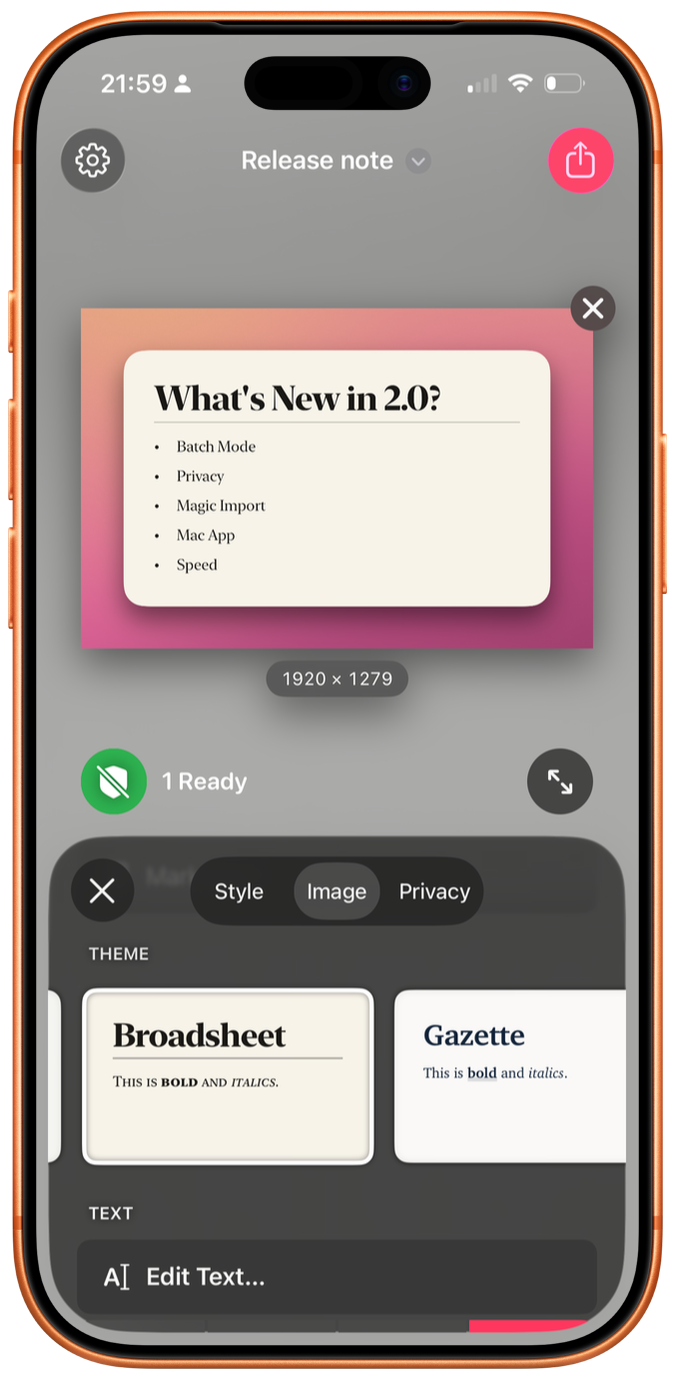
Shareshot 2 screenshot

The framing is now free

Let’s start with the pricing, because it’s the most surprising part of the update. In Shareshot 2, framing a single screenshot over a background — lighting and shadow controls included — is free, with no watermark. Previously, the watermark was the nudge toward paying. Now the developer has simply removed it for the core use case.

That’s a bold move for an indie app. The upsells still exist: custom image backgrounds, batch mode, and the new Magic Import features apply a watermark until you go Pro. But the thing many people install the app to do is now just… free. You know how I feel about paying developers, and Shareshot Pro is $2 a month or $15 a year. That should be very affordable if you’re in the target market for this app.

Privacy redactions, also free

Anyone who takes a lot of screenshots knows that sometimes your image contains information you’d rather not share with the Internet — your phone number, your address, your kid’s face, whatever. Shareshot 2 uses on-device text and face detection to find that stuff. You tap a word or a face to hide it. It knows how to spot names, email addresses, phone numbers, payment details (including IBAN and BIC codes), QR codes, and dates.

The clever bit is that Shareshot remembers what you redacted. Hide your email address once, and the next time it shows up in a screenshot, it’s hidden automatically. That’s damn clever.

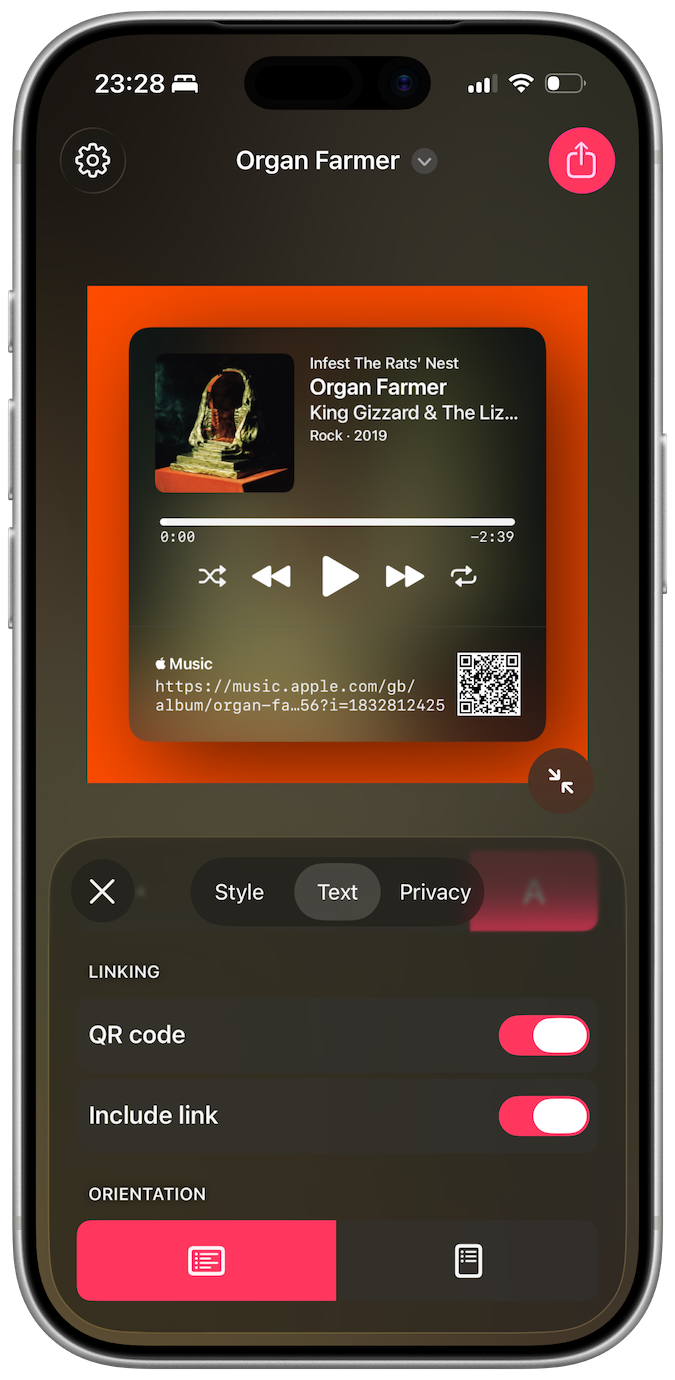
Shareshot 2 screenshot

Magic Import

Magic Import is another one of those features I’d never have thought of, but it’s awfully smart. Paste or type text, and Shareshot renders it as an image with one of a bunch of included themes. Write Markdown, and you get headings, bold, italics, lists, and block quotes. Paste source code, and you get syntax highlighting. It even understands the App Review format from Apple’s App Store Connect app, so a developer can copy a nice review and paste it straight into Shareshot to get a shareable card. I give this feature five stars.

Better still, feed Shareshot a link and it builds a card appropriate to what’s at the other end: posts from Bluesky and Mastodon; Apple Music songs, albums, and artists; podcast episodes and feeds; Apple Maps locations; YouTube videos and channels; App Store apps; and a general OpenGraph preview card for everything else. Each type gets its own style options, and you can include the source link as text, a QR code, or both.

Batch mode, on every platform

If you’re assembling an Instagram carousel, or App Store screenshots for a new release, you want ten images that all match. Shareshot 2 lets you drop in a bunch of images — or a mix of images and text files — and process them all with the same style and output size, with automatic naming for the results. Previously this required a Shortcuts workflow. Now it’s built in.

A real Mac app

The Mac version is no longer a Catalyst app. It’s native, macOS 26 and up, with a proper sidebar and inspector, a real Settings window, multi-window support, and file drops right onto the Dock icon. There’s a Control Center widget on both platforms that creates a Shareshot from whatever is on your clipboard, and on the Mac you can put that widget in the menu bar. The whole app is also considerably faster; style changes render nearly instantly.

The developer

Shareshot is made by Marc Palmer, who runs a one-person shop called Montana Floss Co. in Stroud, in the Cotswolds. Marc has been shipping software for decades.

His other app is Captionista, which adds subtitles and captions to videos for iPhone and iPad. You can transcribe yourself or let it do it for you, tap to split subtitles for precise timing, move and style the captions, and import or export SRT files.

There’s a pattern in Marc’s work: Both apps take a task you’d otherwise do badly in a hurry — framing a screenshot, subtitling a clip — and make doing it well faster than doing it badly.

Shareshot 2 is free on the App Store for iPhone, iPad, Mac, and Vision Pro, with Apple Watch frames included. Pro is $2 a month or $15 a year, and if you make screenshots on the regular, you want it.

Housekeeping

Why LexOnTech exists; why LexOnTech memberships exist

Whim, mostly. Anyway, please consider becoming a member.

I launched Lex On Tech on August 25th.

I built this site because I love writing, and I love technology, and I love writing about technology. The last time I wrote consistently about tech was when I worked for Macworld, which was… a long time ago. I missed it. I have a different site/newsletter where I write about business and sales strategy, but that’s not the right place for pithy complaints about Apple or highlighting cool indie apps.

I built this site because I was inspired by a post Louie Mantia made on Mastodon.

Post by @louie@pdx.social on Mastodon

And I built this site because I’d like to add to the conversation. I suspect many Apple-skewing tech fans share my values, and I’m writing to share my perspective with them.

So far, I’m averaging around four posts per day. I’ve published 20 articles and 14 links, and I have six articles currently drafted that will go live in the week or so ahead.

Why did I launch memberships on a brand new site? I know some readers like supporting independent creators, and I know that frankly I’d appreciate that support. Building and maintaining this site takes time.

Writing takes time. Editing takes more time.

I have a full-time (self-employed) job as a consultant, and I publish a few apps. Essentially, my whole life is side hustles. I don’t love asking you to become a paying member, but it’s part of how I make a living.

The site is free to read, and always will be. Membership is $5 a month or $50 a year. Members get a few perks:

  • A members-only Discord
  • A weekly Lex On Tech podcast
  • A monthly members Zoom
  • Full-text RSS feeds
  • The option to post comments on articles
  • A direct line to ask me questions through the site, which I’ll answer in article form if it makes sense, or by emailing you back directly if that makes more sense

And of course, there’s the private joy of supporting a writer you like. Assuming that, you know, you enjoy your time here.

If you’re looking to support this new site of mine, please consider becoming a member.

Apps I Love Opinion

Marco Arment on what his role with Overcast is

“It’s not really entirely mine anymore.”

Marco Arment launched Overcast in 2014. It was and remains a standalone podcast app. I’ve used it ever since, even while working at companies (like Stitcher and Amazon Music) that made their own podcast apps. Overcast’s approach to podcasts matches my brain’s expectations of how an app should do so. I like that.

Marco is active on the Overcast subreddit, and last month, he shared a fascinating perspective on his role regarding the app he built, launched, and saw success with:

I’ve needed to evolve my expectations for what my role in Overcast is.

After building up a large, passionate userbase over a very long time, it’s not really entirely mine anymore. I can’t just do whatever I want with it.

And the growth era of open/RSS/indie/whatever podcast apps is over. The business is now about serving and retaining my existing customers for as long as possible.

So I can add things here and there, very carefully, but I can’t really change anything significant.

This has been difficult for me to accept, and I’m still not great at it, but I’m getting there.

There are two core parts to break down and think about here.

*It’s not really entirely mine anymore. I can’t just do whatever I want with it.*

Obviously, of course, Marco isn’t speaking literally; it is his app, he can make the changes he wants. But Marco is referring to a sense of obligation — both moral and practical — to an existing customer base, many of them paying customers. If he changes Overcast in ways that alienate a lot of users, that’s problematic for the app’s reputation.

The Overcast app icon: a black radio tower broadcasting orange signal waves inside a cream circle on an orange rounded square.

There’s a general truth in software development of any kind — desktop apps, websites, mobile apps — that many, many people hate change. I remember vividly the web-wide vitriol when Facebook would fundamentally change its interface, or how the newsfeed works. People hated those changes.

On the flip side, though, when something is popular enough, we kind of learn to accept the reality we’re given. Facebook’s history of pissing off its users is real, but it obviously remains insanely popular. Of course, “be like Facebook” is lousy advice in nearly any context. I appreciate that Marco wants to do right by his users.

It’s the second part of his Reddit comment that I’ve kept thinking about for nearly two weeks:

And the growth era of open/RSS/indie/whatever podcast apps is over. The business is now about serving and retaining my existing customers for as long as possible.

I get what Marco’s saying here, and I get why he’s saying it, but I don’t entirely agree. I mean, obviously, my career history — which includes sixteen years on the business side of podcasting — may skew my take here. Certainly, Spotify, Netflix, and YouTube would love for podcasts to become fully proprietary and for Marco’s analysis to prove true.

But I don’t actually think that’s what most listeners want. Spotify owns more marketshare in the US and worldwide than Apple Music, but Apple’s standalone Podcasts app still outperforms Spotify for downloads on most shows. Listeners want the right experience for enjoying the shows they listen to. (And I think the professional podcast industry’s ongoing and endless obsession with video is misguided, and not actually what most listeners want. TV didn’t kill radio. The existence of video doesn’t obviate the benefits and use cases for audio-only content. This is a different essay. I feel strongly about it.)

Overcast crushes it in the Apple nerd community. 72 percent of listeners to my ostensibly tech podcast The Rebound listen with Overcast. I’ve tried many, many podcast apps, and I think there’s still growth potential there. Overcast’s limitation today on the audience growth side is the fact that marketing is hard, especially when giants make free apps that are good enough for many users.

Still, apps like Spotify and Podcasts aren’t amazing podcast apps, in my experience. They’re fine. In some ways, they likely hamper growth; they’re not power listener friendly. I think the openness of podcasting — the fact that the majority of huge shows are still available wherever you get your podcasts — is remarkable and lovely.

Though I listen to podcasts daily and love them, and though I love building apps that work just the way I want them to, I’m not going to build a podcast app right now. That’s because I share what I think is the crux of Marco’s point: It’s hard as hell to launch an app today without a massive marketing budget. You need to get press attention and ideally Apple attention and endlessly ongoing attention. That’s tough.

I’m confident Marco can keep his existing customers happy for a long time. If Overcast keeps working on successive versions of iOS, even if he doesn’t add a ton of features but just makes it a bit better, that’s reasonable. I do still think that there’s growth opportunity for indie podcasts, though. It may be prohibitively expensive.

But my optimism is buoyed by the reality that multiple giant companies have tried to create their own Howard Stern effect with closed podcasts, and failed. Spotify used to limit listenership of its biggest shows to their app; it didn’t work. They’re now all available everywhere. And Spotify wasn’t the only company that attempted this approach and eventually gave up.

I don’t think proprietary video podcasts are a hit for consumers, and I think they continue to reject them. I don’t think the big company apps are really delighting customers; I think the shows they can hear are. I think there’s still growth opportunity available for apps like Overcast, but I share Marco’s perspective that it is awfully hard.

My real point is that I hope it continues to be worth Marco’s while to keep Overcast great, because I love it, and my listening experience would be far worse without it.

Link Apple News

Myke Hurley on three narratives from the John Ternus executive profile

I very much appreciate Myke Hurley’s positive take on Ternus’s updated official bio.

I wanted to note three narratives that I spotted in this profile that I think tell the story of the kind of CEO he wants to be, and how Apple wants to communicate this to us. All three of these are very interesting to me.