MacBook Pro with PROLED XDR Display reviews: The screen is the star, the touchscreen is an afterthought
Everyone loves the OLED panel and the lighter build. Everyone mocks the name. And nobody’s sure they’ll touch the screen much.
The MacBook Pro with PROLED XDR Display reviews landed this morning, and I read a stack of them. Partly so you don’t have to, and partly so I can keep making fun of the name. And also because I didn’t get a review unit.
The laptop ships Friday, starting at $2,899 for the 14-inch and $3,399 for the 16-inch.
I should say up front: I haven’t used one. I don’t own a laptop at all right now; when I’m away from my desk, I use my iPad to control my Mac Studio. More on that at the end. But the reviews are remarkably consistent, so here’s the consensus I’m seeing.
Let’s get this out of the way, since I already complained about it. The Verge’s David Pierce says he’ll just call it “the PROLED Pro from now on, because ugh, the name.” Engadget’s Devindra Hardawar calls it “awkwardly” named, and suggests it should have been the MacBook Pro Ultra. Gizmodo’s Kyle Barr says it’s “a terrible name, and I don’t think it will stick around.” Six Colors’ Jason Snell is kinder, opening with the observation that the laptop is, “like its name, a bit overloaded with meaning.”
Every review raves about the tandem OLED display. It hits 1,000 nits in standard dynamic range, up to 2,000 nits for HDR, and a 10,000,000:1 contrast ratio. Wired’s Luke Larsen lists it as “the best laptop display ever made, bar none.” Barr says it’s “truly one of the best screens I’ve had the chance to use on a laptop,” and that “the screen at its blackest practically bleeds into the bezels.” 9to5Mac’s Chance Miller calls it simply “stunning.”
In direct sunlight, the ambient light sensor lets the display push SDR content all the way up to 2,000 nits. Snell’s take: “even in direct sunlight, you do need to see your computer’s display to get anything done.”
The honest caveat comes from Hardawar, who spent hundreds of hours with the previous mini-LED MacBook Pros and found the difference “a bit hard to see” in normal use. Dark movies are where it shines; the fireworks at the end of F1 “felt absolutely revelatory on these screens.” Larsen measured HDR brightness only about 12 percent higher than the mini-LED model, but says that paired with OLED blacks, the difference is “very noticeable.”
The reviewers can’t agree on whether to pay extra for nano-texture glass. Barr says skip it: “It’s not worth it.” Larsen says if you really want to work outside, “the nano-texture upgrade is well worth it.” I hope that clears things up.
It’s a lot lighter
The 14-inch model weighs 3 pounds, about a half-pound lighter than before; the 16-inch drops to 4 pounds. Snell, a longtime MacBook Air devotee, may be happiest about this: “To cut 15 percent off the weight of a fairly mature laptop without sacrificing any battery life? It’s a design choice that deserves to be celebrated.” Pierce notes that the 14-inch is now closer in weight to a 15-inch MacBook Air than to the old 14-inch Pro.
Miller tested the 16-inch: “It’s not light, but it feels less like a tank.” He says it has him reconsidering his longstanding preference for the smaller model.
The notch is gone; long live the Dynamic Island
The camera now lives in a small cutout, and Apple turned it into a Mac-sized Dynamic Island for Now Playing, Live Activities, Spotlight, and Siri. Larsen, who calls the notch “a complete eyesore,” says this might be the change he was most excited about. Snell: “The notch never really did anything—it was just a dead zone. The Dynamic Island serves a purpose and the MacBook Pro is better for it.”
Pierce likes it too — but adds, “I never tap the thing.” Which brings us to the touchscreen.
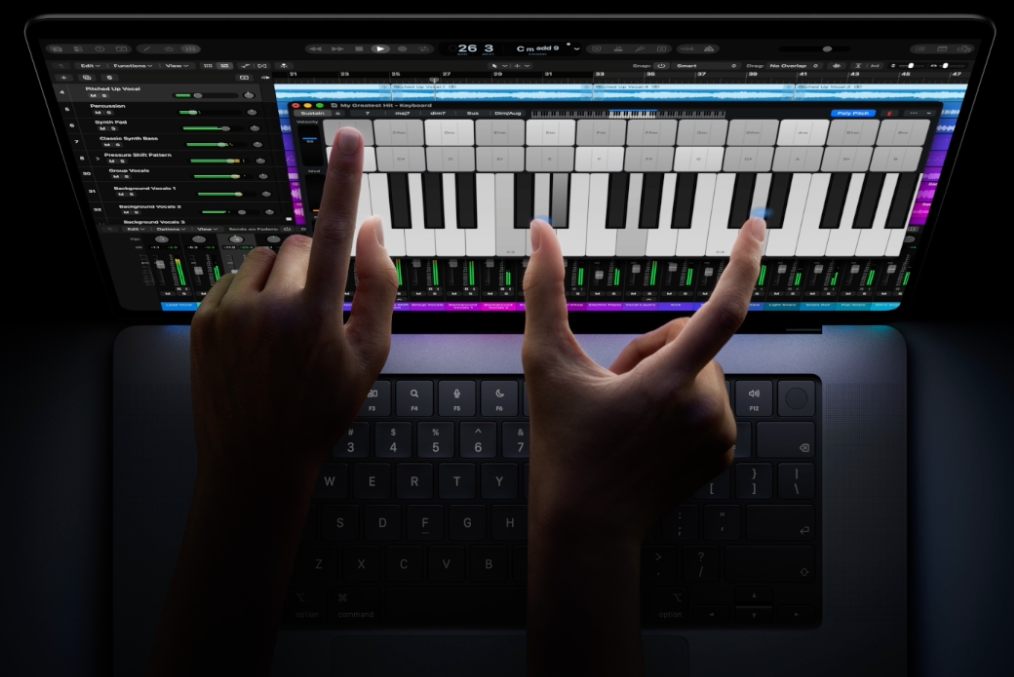
The touchscreen is… present
Here’s Engadget’s opening line, which pretty much sums up every review:
The least interesting thing about Apple’s new touchscreen MacBook Pro is the touchscreen.
Apple didn’t reinvent macOS for fingers. A tap is basically a click. Pierce calls it “a mouse emulator and nothing more.” Apple made a few small accommodations: Tap the window controls and they balloon out into bigger targets, and tapping the menu bar spaces things out. But there’s no onscreen keyboard, no fancy hinge, and no Apple Pencil support. Pierce found some game buttons that simply wouldn’t respond to touch, and Larsen found that some apps running through Rosetta don’t get the touch-friendly window controls at all.
Larsen calls the implementation “half-baked,” and says: “when I’m deep in work, I completely forget the touchscreen. It just has no place in my workflows.” Miller cites Steve Jobs’ old warning about touchscreen laptops, and agrees: “The ergonomics of using a touchscreen as the primary input method on a laptop-style device are, in fact, terrible.”
Still, nobody hates it. Pierce found it useful “more often than I expected” — pinching to zoom on photos, tapping a video to pause, and especially showing someone something on his screen. He estimates a half-dozen taps a day, “which I think is plenty.” Barr: “The touchscreen is occasionally useful. It’s not the end-all-be-all. But it sure is handy.” Snell calls it “a nice-to-have additional input mechanism, and that’s all,” and thinks Apple was right to keep it that way.
Pierce sums it up: “It’s a laptop that happens to have a touchscreen.”
And if you hate fingerprints on your screen as much as I do, Snell notes that you can turn touch off entirely in Accessibility settings.
The Apple logo glows again
I’m not so excited about this, but seemingly everyone else is. With no backlight behind an OLED panel, Apple engineered a separate light source just to make the lid’s Apple logo glow like it did in the PowerBook days. Miller: “It’s unnecessary, but I’m so thrilled it’s back.” Larsen calls it “a pure, unabashed status symbol. And I love it.” Snell goes the furthest, calling it “a tangible example of Apple staying in touch with its soul.”
Same chips, (mostly) same everything else
These use the same M5 Pro and M5 Max chips Apple put in the MacBook Pro back in March, and they benchmark the same. Snell points to Mark Gurman’s report that Apple canceled the M6 Pro and Max to get to the M7 generation sooner, which makes this a slightly awkward moment to buy. Ports, keyboard, and trackpad are unchanged. Hardawar got about 12 and a half hours out of the 14-inch on his normal workload; Pierce ends heavy workdays with a third or more of his battery left.
The speakers got a bass boost, and here’s the one spot where the reviewers split. Hardawar blasted music in his backyard with no distortion. Larsen says Apple “already had the best speakers in the game,” and that these are better still. Pierce isn’t a fan: “Everything sounds like it’s playing in a large, empty warehouse.”
And it’s expensive
The PROLED models cost about $400 more than comparable mini-LED MacBook Pros — and that’s on top of the price hikes Apple made in June. Hardawar frames it more starkly: The 14-inch starts $900 higher than the base 14-inch MacBook Pro. Barr notes that Apple “seems to be producing laptops built for our current K-shaped economy.” Pierce’s review unit cost $3,699; Larsen’s $7,399. (Fully loaded, Pierce notes, it’s $14,549. “You are my hero. And I have some questions.”)
Hardawar adds: “At these price levels, we’ll have to start thinking about buying computers like we do cars, where it rarely makes sense to buy something new.”
The verdicts
The scores are strong, especially for a laptop whose headline feature everyone shrugged at. The Verge gives it a 9 and calls it “a winner.” Engadget gives it 8.8, and suggests that the 16-inch model is the better value. Gizmodo gives it 4.5 out of 5, under the headline “Screw Touchscreens, It’s Still the Best Mac.” Wired gives it 8 out of 10, and warns that if you already own an M5 Pro or M5 Max MacBook Pro, the upgrade is “very difficult to justify.” Miller says Apple has “taken an already excellent laptop and made meaningful improvements to nearly every aspect of the experience.”
Pierce’s advice is the most practical: If you bought a MacBook Pro in the last couple of years, don’t throw it in the trash. But if you’re still on an M1-era model, “the PROLED Pro is the one to get.” And Snell is reassuring: This design will probably be around for years, “so if now is not the time for you to take the plunge, relax—there’s always next year.” I believe that point, about next year existing, more post blue tsunami.
So, honestly
I’m not buying one. I don’t own a laptop, and my setup — a Mac Studio at home and an iPad Air that controls it when I’m away — works great for me. And the marquee feature is literally one I’d turn off on day one; I want my screen pristine.
The reviewers seem to agree that this design is the future of the MacBook Pro, and maybe the whole MacBook line. Someday, a lighter, OLED-equipped MacBook may tempt me back into laptop ownership. Hopefully, with a better name.