LexonTech

Tech, mostly Apple, from Lex Friedman.

MembershipMembers can comment on posts, hang out in the Discord, and join a monthly Zoom with Lex.Join now
Opinion

Streaks considered harmful

(Please ignore the fact that I’ve published something on this site every day since I launched it.)

I’ve studied a language in Duolingo nearly 500 days in a row. My solved Wordle streak is in the low hundreds. I’ve closed the rings on my Apple Watch every day for a bajillion years, roughly. I’ve solved LinkedIn’s Patches puzzle 174 consecutive days.

I hate streaks.

I have a few different games on the web and in app form. I know registered users’ streaks. The data’s sitting right there in the database. But I don’t surface them anywhere.

Duolingo's Duo mascot

Streaks are evil. They’re evil because they work. I do Duolingo every damn day so that I don’t lose my streak, and there are times I absolutely don’t want to do Duolingo. I hate that I’m doing it as I do it, I hate that the streak conceit is having its desired psychological effect upon me, and yet there I sit, practicing more French.

I’d love to tell you that I’m just weak-willed and that you, dear reader, are made of sterner stuff. But the research suggests we’re all equally lemming-like in this way.

Jackie Silverman and Alixandra Barasch published a paper in the Journal of Consumer Research in 2023 called “On or Off Track: How (Broken) Streaks Affect Consumer Decisions.” Across seven studies, they found that simply showing people an intact streak made them more likely to keep doing the thing — and that this effect had nothing to do with how much they’d actually done the thing. It depended entirely on how the behavior was displayed in the log.

Their explanation is the part that, frankly, sucks: People come to treat maintaining the streak as a meaningful goal in and of itself. Not learning French. Not exercising. The number.

(This is why Duolingo is happy to offer Streak Freezes. It’s incredibly defeating to see your hundreds-day-long streak reset to zero… So the app fights never to let that happen, unless you go a really long time without using it.)

I’m not a scientist, but my read of the study is that far too often, I’m not practicing French; I’m incrementing a counter for the goal of incrementing the counter. There are absolutely days where the lesson I pick is the shortest one I can find. (Often “Words.”)

Wordle results screen reading “Congratulations!” with stats: 1527 played, 98 win %, 195 current streak, 195 max streak.

I’m not trying to get better at anything. I’m trying to not be the guy who let a 500-day streak die on a Tuesday because he was tired. (Is that guy worse than the guy who does a few perfunctory minutes of French he won’t remember? Reader, we all know the answer, and trust that I absolutely do the perfunctory few minutes anyway.)

The flip side is just as well-documented, and just as insidious. Silverman and Barasch found that a broken streak is demotivating out of proportion to what was actually missed. Skip one day and you’ve failed twice: once at the behavior, and once at the streak. People are so attached to streaks that they’ll complain to companies when a bug wipes one out and lobby to get it restored. Meanwhile, the researchers found the demotivating effect of a broken streak shrinks when you’re allowed to repair it.

Which brings us to the owl. Duolingo doesn’t sell streak freezes and streak repairs because it’s kind. Again, it offers them because the research says a broken streak makes you quit, and a quitter doesn’t pay for Super Duolingo. The freeze is a product designed to protect a number that the product itself convinced you to care about. That’s a clever business. It’s also gross.

None of this is new psychology, either. Daniel Kahneman and Amos Tversky’s work on loss aversion established decades ago that losing something hurts roughly twice as much as gaining the equivalent thing feels good. I couldn’t come up with a better way to frame that sentence, so read it again if it didn’t make sense.

Okay, fine, here’s a rewrite: Losing something hurts twice as much as winning that thing feels good.

A streak is a loss-aversion machine you carry in your pocket. Every day you extend it, it gets a little more painful to lose, which is exactly why day 500 is harder to skip than day five. Apps with streaks aren’t building habits. They’re building hostages.

And look, I get the counterargument. I am theoretically at least a bit better at French than I was 500 days ago. My rings are closed, and closed rings mostly mean I moved my body. Streaks arguably got me to show up on days I otherwise wouldn’t have. Ends and means and all that.

But I don’t think the ends justify the means, for two reasons. First, the streak optimizes for the minimum. It doesn’t care whether you did a good lesson or a good workout; it cares whether you did any lesson or a workout. Over enough days, you learn to feed it the minimum, and the minimum becomes the habit.

Second, and perhaps more importantly, I don’t like how it feels. I don’t like the small dread at 10:30 p.m. when I realize I haven’t done my French yet. I don’t like that a game I ostensibly play for fun has a mechanic whose entire purpose is to make not playing one day feel bad. Fun shouldn’t have a late fee.

So: My games. I know how many days in a row you’ve played, say, Conlextions. I could put a little flame icon next to it. I could send you a push notification at 9 p.m. that says your Conlextions puzzle solving streak is in danger. I’m confident that doing so would increase my daily active users, because the research says it would because I’m my own goddamn guinea pig and I see it work on me every freaking day.

I’m not going to do it. If you want to play one of my games every day, I’m delighted. If you want to play it every day for a month and then forget it exists for six weeks and then come back, I’m also delighted, and I’d rather you come back without feeling like you have to apologize to the app. I want you to play because you want to play. I make games, not leashes.

That’s probably costing me some engagement. I’m okay with that.

I haven’t done my Duolingo yet today. I’d like to promise you that I’m going to skip today just to stick it to the man, and the psychology. But I guarantee you I’ll do it before I go to bed.
Apps I Love Indie Developer Spotlight

Paku offers a high quality look at air quality

Air quality in the US is much better than it was decades ago — but wildfire smoke is threatening and even reversing some recent gains. Worldwide, air quality is improving over time, overall… But that’s mostly thanks to some huge countries in Asia making improvements, while other regions have air quality that’s static or getting worse.

You may care about the US. You may care about the world. But you probably care most about the air quality where you are. That’s reasonable. That’s the air you’re breathing.

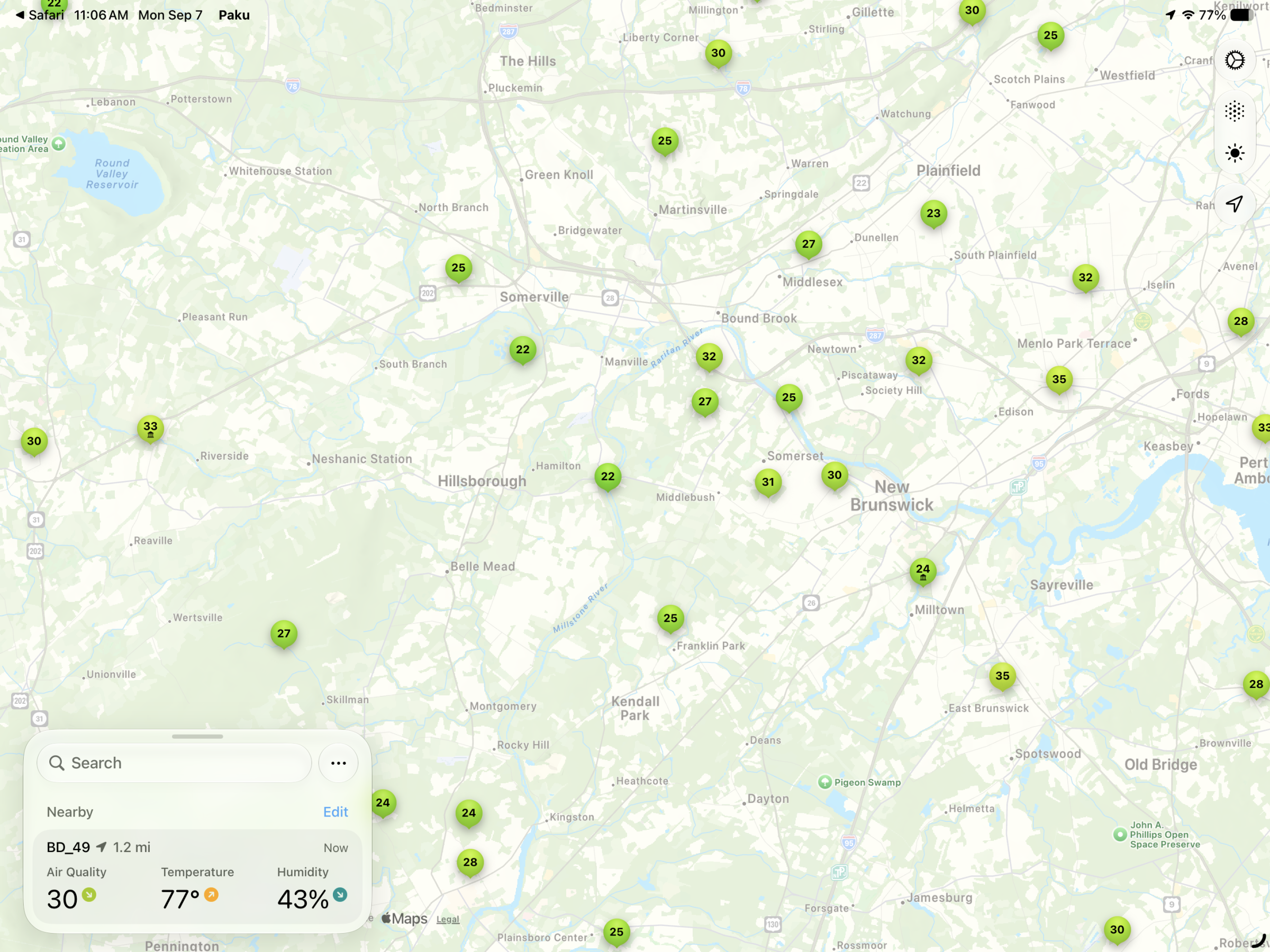
Paku’s main screen
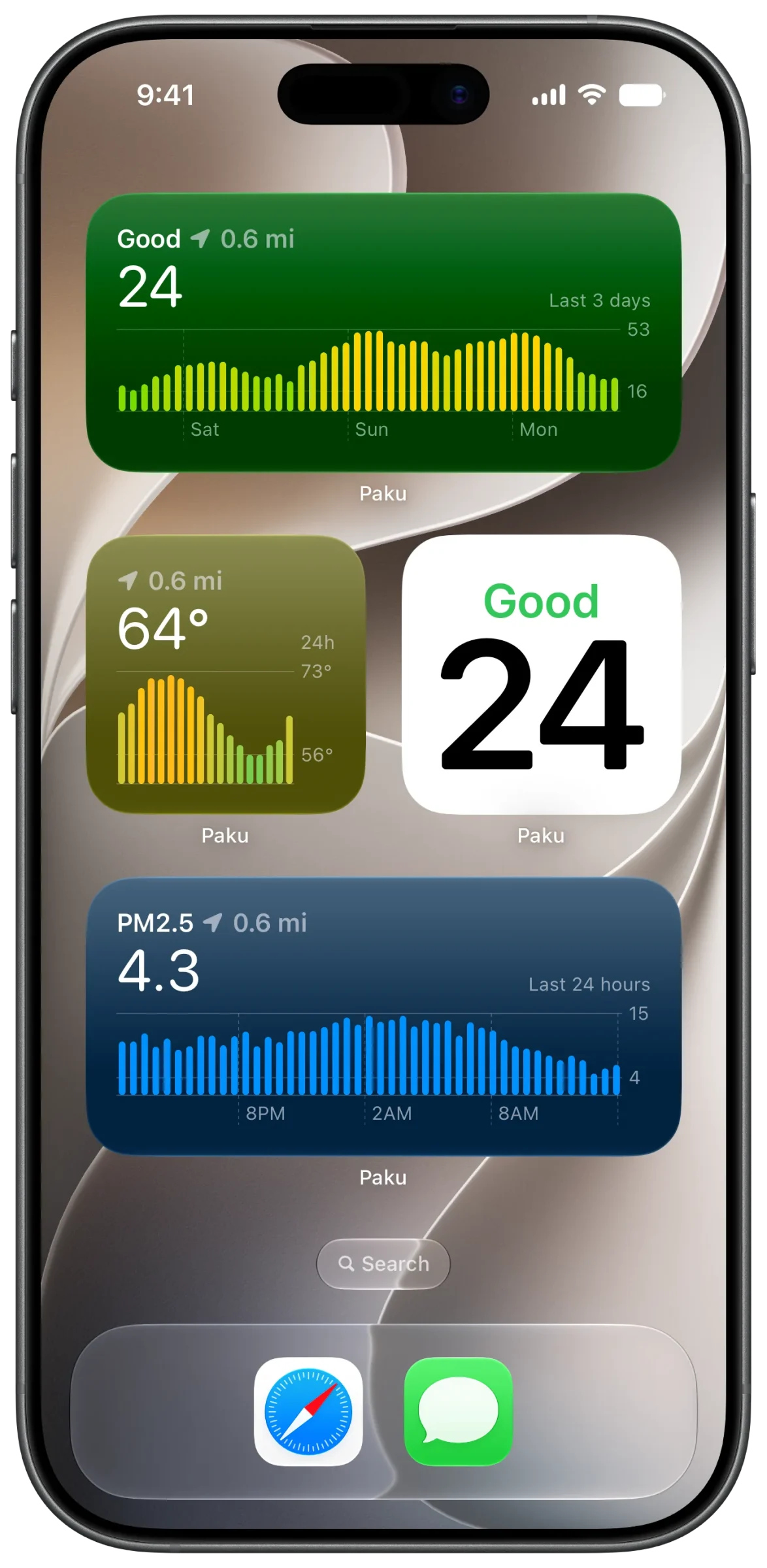
Paku widgets

That’s what Paku is for. The app gathers data from PurpleAir — devices for real live humans to gather real live data about the air around them. These devices are popular. Your neighbors may have one. You may have one. It’s awfully likely that someone around you has one, and Paku gathers data from the closest PurpleAir users around to give you real-time updates on the air around you.

The app comes from developer Kyle Bashour, and it’s clear he’s passionate about air quality — because Paku is passionate about air quality. I know this statement has an intangibility to it for which I apologize, but the app just works the way it should. Your default view is a map of the area around you, with nearby sensors indicated, and your current air quality status.

Paku embraces a slew of core integrations Apple offers developers: You can get notifications when air quality near you exceeds a certain level, use Live Activities, add widgets, and more.

Basic features are free; premium ones require a subscription. If you’re someone who regularly inhales air, Paku is worth a look.

Indie Developer Spotlight News

McKinley is a real editor for SF Symbols

Amy Worrall’s new Mac app launches today. Its pitch: never open the SF Symbols app again.

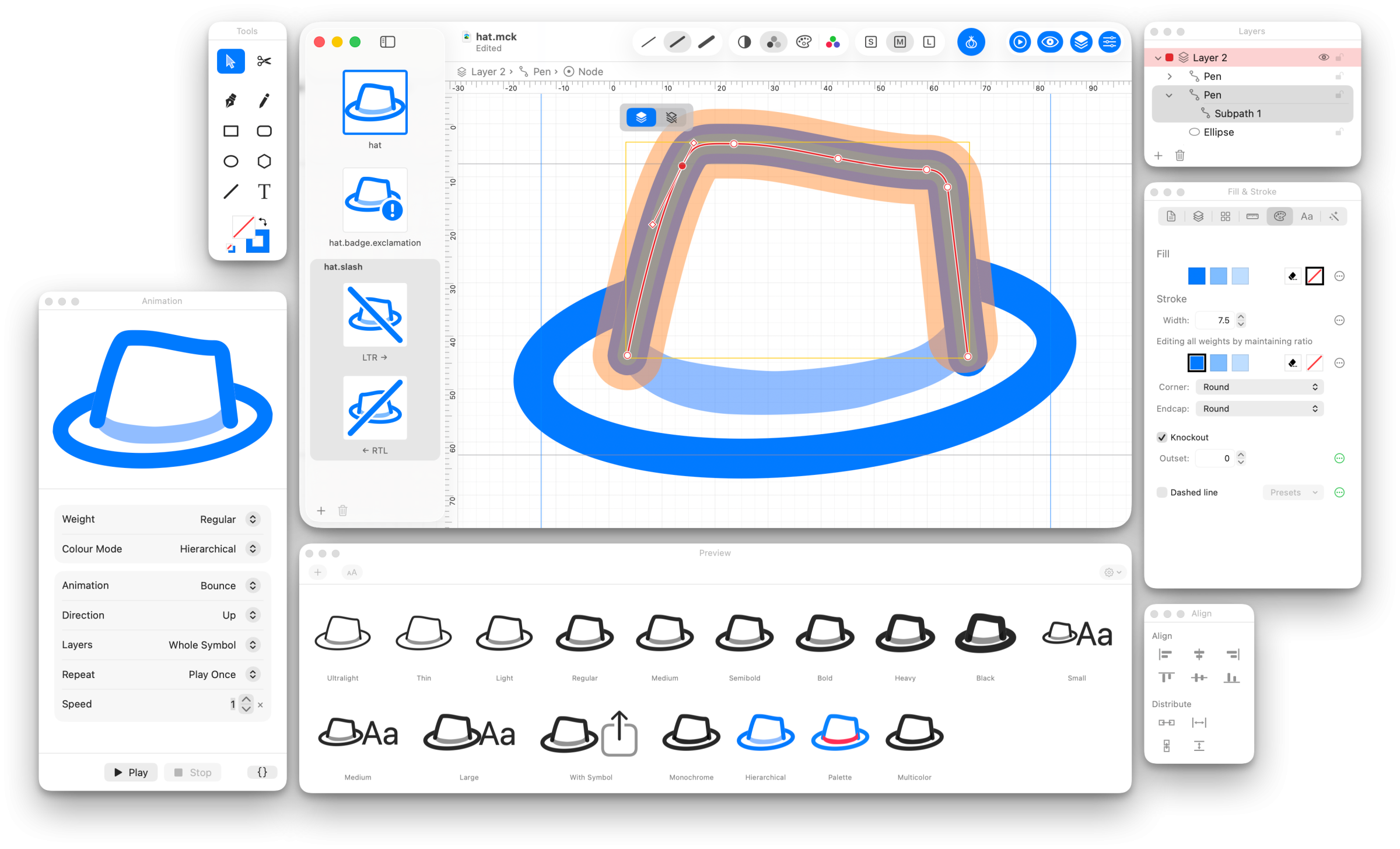
The McKinley workspace, with a hat symbol open for point editing and the Preview palette showing it across weights and rendering modes.
The McKinley workspace: one set of objects, previewed across every weight by Apple’s own renderer.

If you build apps for Apple’s platforms, you likely use SF Symbols. Apple ships thousands of them, they’re very well designed, and most of the time the one you need already exists. Then there’s the time you can’t find the precise Apple-drawn symbol that your app needs, and you need to make your own. Now, there’s a new app for that.

Today, Amy Worrall — the indie developer behind Double & Thrice, whose Octavo you may already know — is releasing McKinley, a Mac app that feels a bit like a custom Photoshop just for SF Symbol creation.

Making a custom symbol means drawing over Apple’s template in a real vector app and hoping you named the layers correctly, or wrestling with Apple’s own SF Symbols app, which is a very good symbol browser and a considerably less good symbol editor. Apple wants your symbol drawn at three weights so that it can interpolate the rest. That can lead to some pain.

The McKinley app icon.

McKinley is a real vector editor: Bézier paths, boolean operations, shapes, freehand, text, layers, groups. A lot of this is standard for a certain class of image editor. What’s unique is that McKinley knows what an SF Symbol is. You draw one set of objects, and McKinley keeps them point-compatible across every weight, size, and color by construction — no separate drawing per variation. The geometry stays linked while you work; if Black genuinely needs a different shape than Ultralight, you unlink that one bit and leave the rest alone.

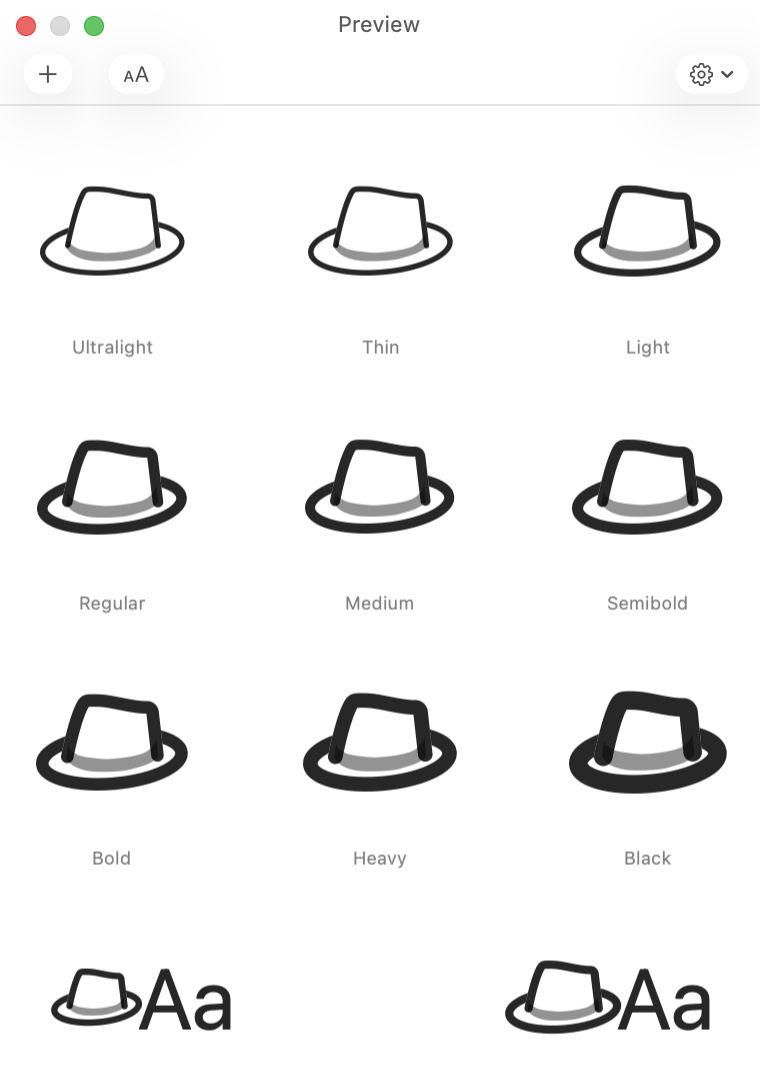
McKinley’s Preview palette showing the same hat symbol from Ultralight through Black.
The Preview palette, drawn by Apple’s renderer.

A few more things Amy got right:

  • Strokes stay strokes. You don’t convert to outlines before export, and stroke width can vary per weight.
  • Colors go on objects, with no special layers required. Monochrome, hierarchical, palette, and multicolor rendering all fall out of that.
  • Badges, slashes, and enclosures are adornments. Change the base symbol and the badged and slashed versions update with it, left-to-right and right-to-left variants included.
  • The preview is Apple’s own renderer. What you see in the Preview palette is what your app will draw, across every weight and rendering mode, with an animation preview next to it so you can watch your symbol bounce before you ship it.
  • Full-featured import and export. Import an SVG, or start from an existing SF Symbol, Material Symbol, Phosphor, or Iconify glyph. Export syncs straight into your project’s asset catalog. It also exports Android VectorDrawable and plain SVG, for developers living that cross-platform life. (My condolences.)
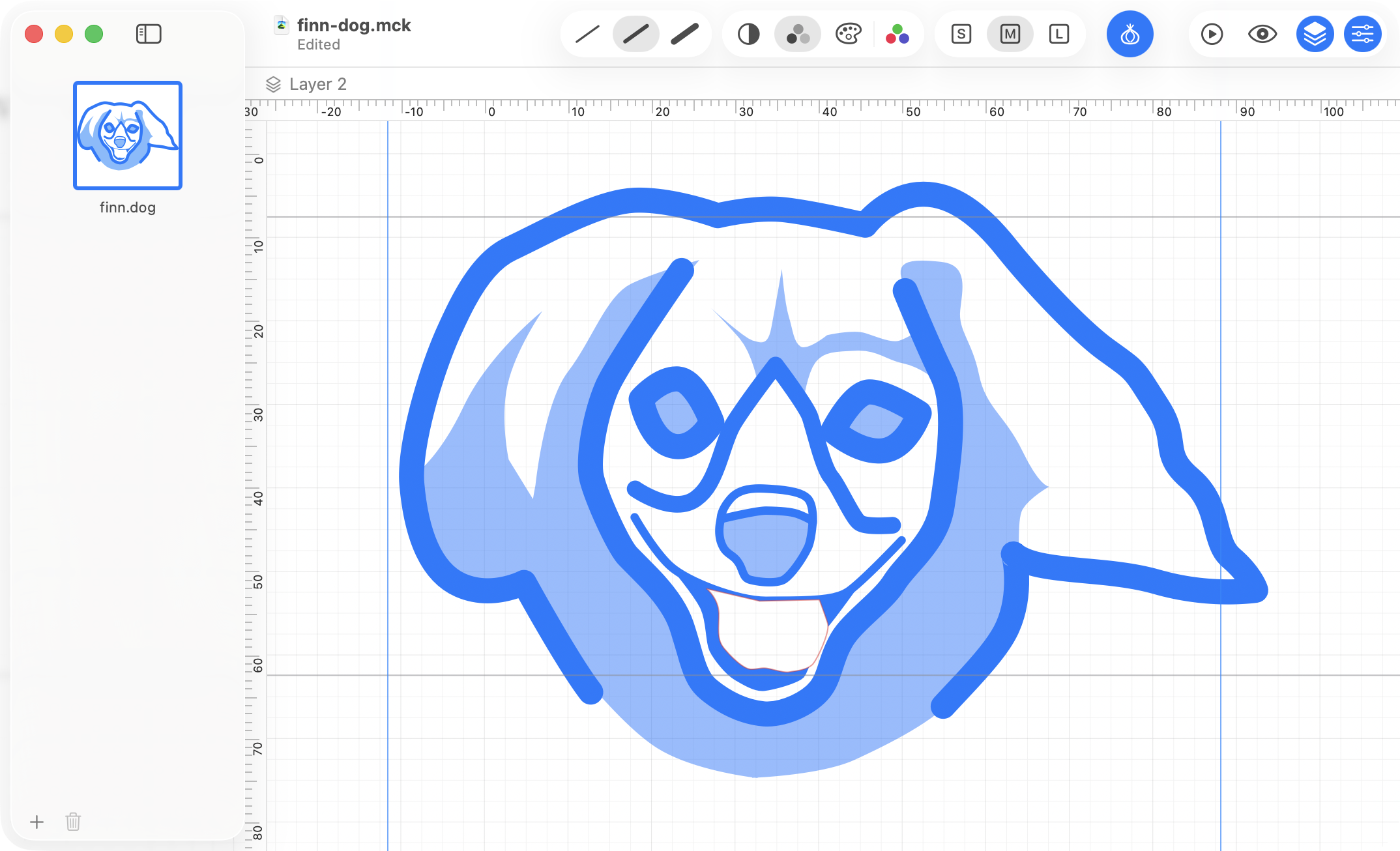
A more involved symbol of a dog’s face in McKinley, drawn with strokes and fills.
A more involved symbol, drawn with strokes and fills and kept that way. Nothing here was converted to outlines.

Amy’s press kit describes McKinley as “a Mac-assed Mac app,” and that’s true in my exploration. Native AppKit, Quick Look previews, a full AppleScript dictionary. It looks like a true Mac app, because it clearly is one, built by someone who gets what makes a good Mac app a good Mac app.

It’s a one-time purchase, not a subscription, and you know I don’t mind paying indie developers for the tools that save me time.

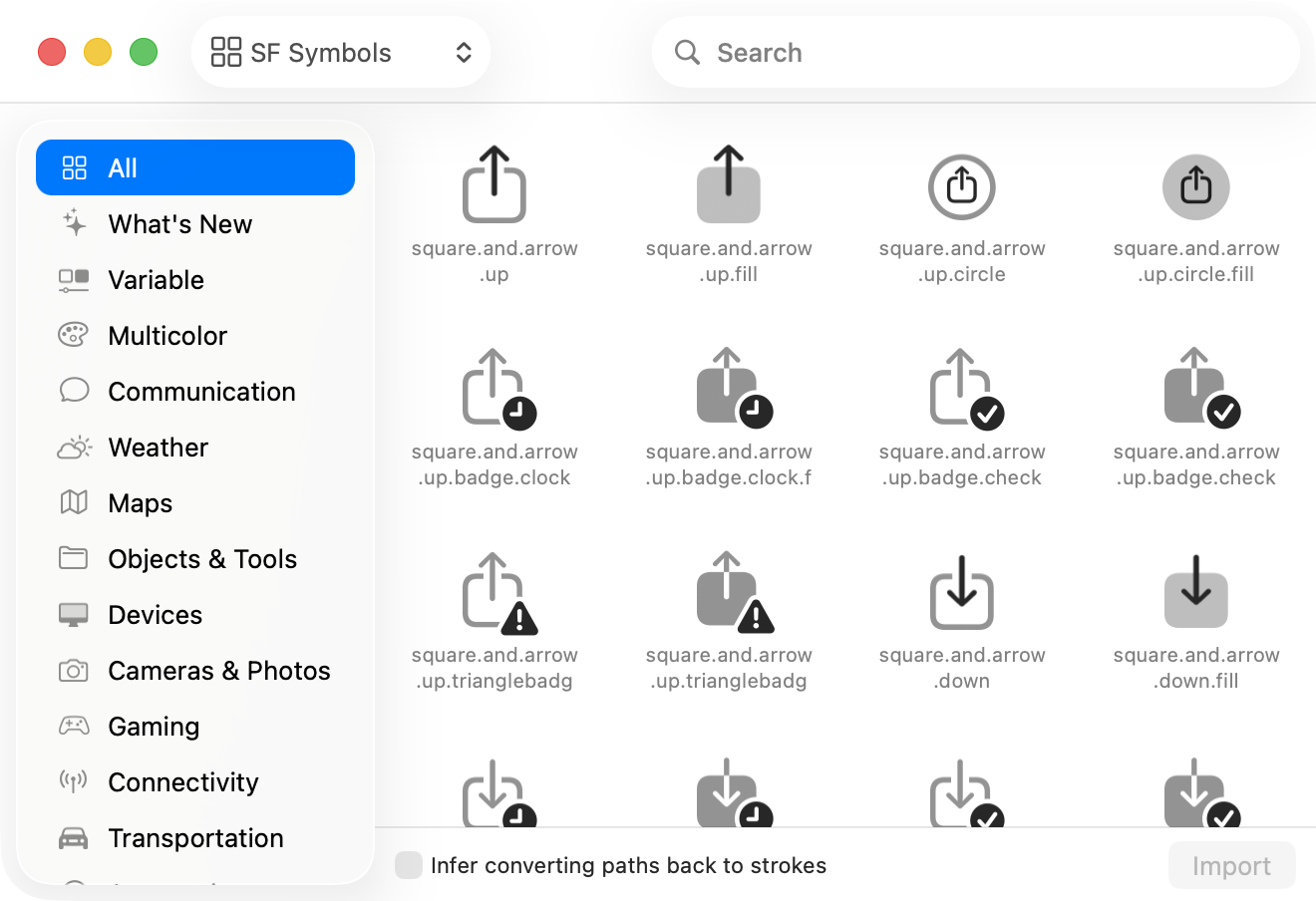
McKinley’s Symbol Library browsing Apple’s SF Symbols.
The Symbol Library: start from one of Apple’s and modify it.

McKinley launches today, Monday, September 7, at 11am UTC (that’s 7am Eastern). It’s $60, £55, or €65, bought once, and that includes every 1.x update. If there’s ever a version 2, version 1 owners get a discounted upgrade, and version 1 keeps working either way. For launch week it’s 15% off — $51, £46.75, or €55.25 — until 11am UTC on Monday, September 14.

It’s sold direct from mckinleysymbols.com, and there’s a free 14-day trial that is the complete app, saving and exporting included.

Link News

Nitter and XCancel are back

Following legal advice, the Nitter project will continue. This instance and others will be back up and running shortly. An announcement will be made within a week, once we’re able to reveal more information.

X shut them down. They’re back. That’s a positive.

It’s also worth checking out the free Safari Extension Litterbox if you’re — like me — loathe to visit X.

[Via JAG’S Workshop.]

Apple Ask Lex Opinion

Ask Lex: Is it still possible to be a big-time Apple fan?

Lex on Tech members can submit questions that I answer right here on the site. Reader Geraint asks:

Yes.

My friend Dan Moren’s written a bit on this topic, both at Six Colors and Macworld. Being an Apple fan in 2026 is different from being an Apple fan in, say, the nineties.

Apple logo

The most fundamental change, of course, is that Apple is no longer the underdog. Apple is the alpha, one of the most valuable companies in the world, and almost immune to screwing up: When you have as much money as Apple does, you can afford to make many, many mistakes and still have near-infinite runway.

Apple’s leadership has changed, a few times now, since the nineties.

At its core (ha!), Apple is a company. Companies aren’t your friends; corporations aren’t people. Apple’s loyalty is to its shareholders first. Employees and customers come somewhere after that. Apple has a fiduciary responsibility to act in the interests of the company and its shareholders, which of course ultimately means creating more value. That’s the job.

There’s leeway there: Apple can decide that defending privacy or forward-thinking environmentally-friendly policies are good for creating value. Or that creating great products and software are both good for creating more value. I think Apple the corporation does believe these things.

Apple also makes decisions I strongly disagree with: Cozying up to the Trump administration, fighting against developers and whether they owe Apple in certain circumstances in court, raising prices, refusing to bump the base iCloud storage tiers.

I’m not saying any of these decisions is indefensible; I’m saying that they suit Apple’s best interests, and Apple’s shareholders’ best interests (in Apple’s view, anyway); not mine as a customer.

But Apple also makes great hardware and software. I derive joy from using my Mac and iPhone and iPad, and from building apps. What’s more, I derive joy from being part of the Apple community. Friends like Dan and Jason Snell and John Moltz and many others — they’re people I know and befriended because of Apple’s existence, as a unifying fandom for nerds of a certain stripe.

It’s okay to be a passionate Apple hobbyist. It’s harder than it used to be, maybe, but you can love what it means to you to be an Apple user, even if you don’t have the same affection for the company you once did.

Indie Developer Spotlight

Deep Green 2.1 is elegant, free chess for iPhone and iPad

Fun for you. Not your mates.

Deep Green is a chess app. It’s not a telemetry-loaded, ad-serving, account-requiring app. It’s a chess app.

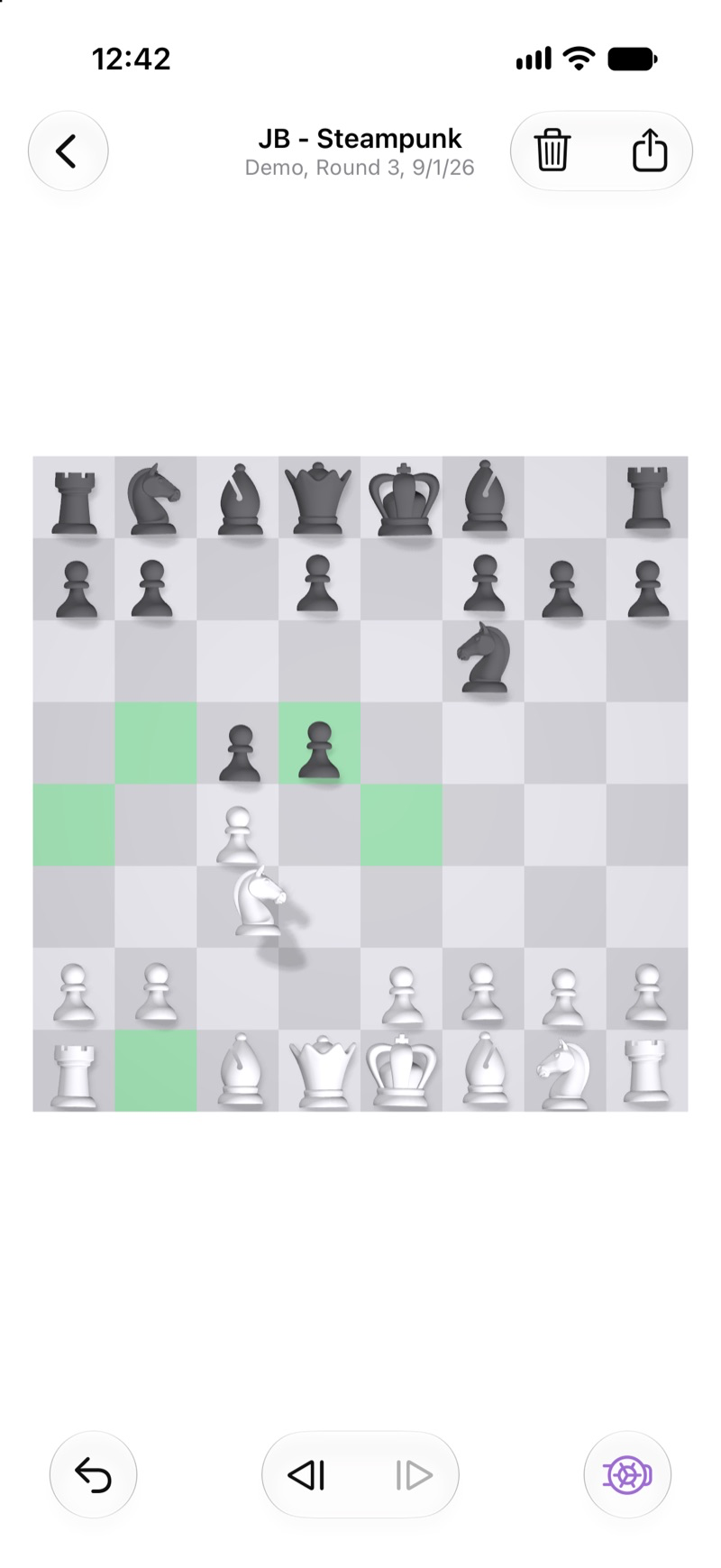
Deep Green showing eligible piece placements

And it’s not just any chess app. It’s a chess app that dates back to the Apple Newton in 1998. I never had an Apple Newton. This is a regret of mine. This is a non-sequitur that has no place in this article, but this is my site, so no one can stop me.

When developer Joachim Bondo released Deep Green, it was after Steve Jobs had already canceled the Newton. When the App Store launched in 2008, Bondo released Deep Green there. The iPhone, as it turns out, outlasted the Newton.

Bondo describes the app as being “made for people who want to sit down [and] play a thoughtful game of chess.” Bloated chess apps with subscriptions and tournaments and streaks treat players as pawns, if you will. Deep Green aims to treat you like a queen.

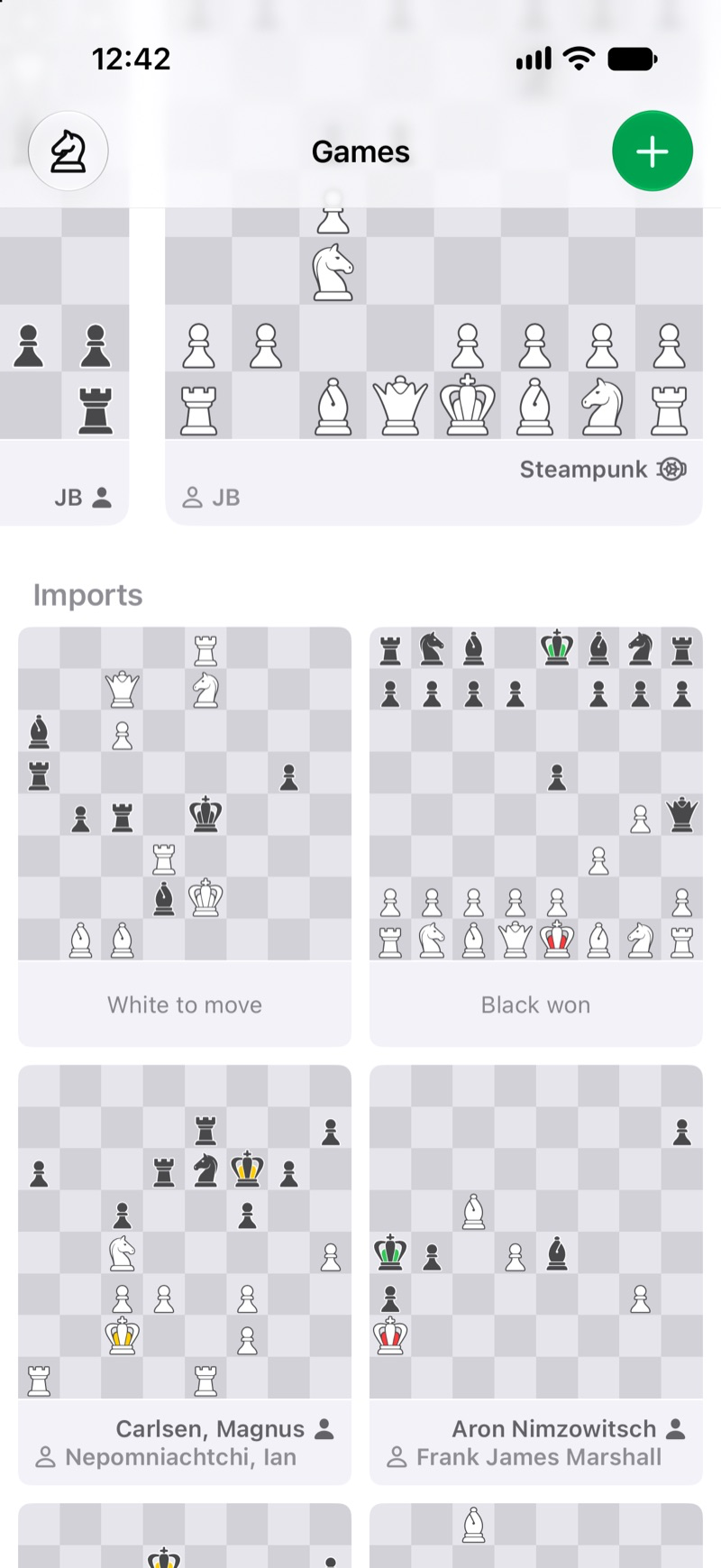
Deep Green UI

(Too many chess puns is a rookie mistake.)

Deep Green offers a variety of customizations, so even picky players can configure things in ways that suit their needs.

The app’s business model is nonexistent: It’s free. It’s a passion project now, where once it had a fee associated with it. It works great on an iPhone or iPad. And it’s compatible with the main open source chess board formats, PGN and FEN.

Bondo lives in Denmark, and is the CEO of a mobile development company headquartered in Nyhavn, Copenhagen, where yours truly logged *many *steps this summer, though I was never confident I knew how to pronounce “Nyhavn.”

Updated 11:48am ET on September 5 to correct that Bondo lives in Denmark, not Norway.

Ask Lex

Ask Lex: Where is social media headed?

Lex on Tech members can submit questions that I answer right here on the site. Reader George asks:

I wish I were better at predicting these things. I thought MySpace, Facebook, and Twitter all were silly when they launched, and then I quickly joined them, because that’s where the people who I wanted to interact with were. MySpace had my real-world friends (and coworkers… in part because I eventually worked at the parent company of MySpace as its first ever full-time PHP/MySQL web developer). Facebook had my current friends and my faraway friends from high school and summer camp. Twitter had cool Apple nerds and funny people and real-world friends and Internet friends.

Twitter — especially “timeline” Twitter, where there was no algorithm customizing what you saw and when — felt like magic to me. It captured the delightful joy of Away messages, and it felt (to me, anyway) like a perfect mix of broadcasting and communicating. The one-way relationships felt innovative; I could follow someone even if they didn’t follow me, but it still felt like a connection. Sort of.

Obviously, they’re all wildly different today, and you don’t need me to rehash the changes there.

But the most impactful change to social media over time is algorithms vs. timelines. Even Mastodon and Bluesky offer algorithms, though they default to timelines. And the algorithms — on those sites, on Threads, and elsewhere — are pretty good, even though I hate to admit it. They surface posts I find interesting that I likely otherwise wouldn’t have seen.

The most oppressively perfect algorithms are the ones from the short-form video networks: Instagram Reels, TikTok, YouTube Shorts. These services are frustratingly good at serving up maddeningly addictive endless short form video content based on what you watch, share, like, receive from friends, etc. They feed us content we like, love, tolerate, or swipe past in case the next video is funnier or more fascinating or whatever.

a still from Wall-E of humans watching screens
This, I’m afraid, is where social media is going.

There are pluses — many of them, in fact — to the decentralizing of social media, and I don’t just mean federated networks like Mastodon. I mean the fact that the whole conversation isn’t happening in just one place is overall a good thing; it lets more voices be heard, and should help prevent misinformation from spreading quite as far, fast, and wide.

Except it doesn’t really work that way. X is full of its child pornography and hate speech and misinformation. Sure, folks who are willing to tolerate the cesspool can filter things so that they mostly see the stuff they want to see — but too many users are seeing awful things. Threads and Instagram and Facebook are all insanely popular, and they do a great job of feeding you more of what you like, helping us silo ourselves off. It’s not echo chambers, at least not how I think of echo chambers, because these networks are now far more about a smaller subset of creators being consumed by many. So we’re not repeating as much as hearing the same crap over and over again.

Mastodon has no chance of dethroning Facebook or X. Frankly, there aren’t enough cool kids there, by which I mean famous people.

That’s okay, I guess. It does mean that overall, for my purposes, Mastodon is a nice place, and less of a firehose than Twitter once was.

Someone, someday will unseat Meta and X as the centers of whatever we call social media then. It won’t be the metaverse, it’ll probably involve video, and I can’t promise it’ll be better than what we have now.

But I think social media will continue to find advanced ways to trigger dopamine loops that are very similar to other forms of addiction. We’ll all find the ones that have the friends and/or creators we find most interesting, and we’ll spend too much time there.

Link News Odds & Ends

CNN: How smart underwear is tracking people’s farts

I was going to link to this story. Then I wasn’t.

Then I saw “Human Flatus Atlas,” and I thought that was pretty great, so linking won out.

The smart underwear is the first wearable designed to measure human flatulence. The measuring device is a small disc that snaps into the back of a person’s underwear. It then uses tiny electrochemical sensors to detect hydrogen, providing insight on the wearer’s flatulence. The results contribute to the Human Flatus Atlas, a research project that has recruited people around the world to wear the smart device while also documenting every meal they eat.

Apps I Love

Retrogram offers beautiful and clever word games

In a surprise to no one, I like word games. (I offer Lex.Games, Cryptograms by Lex.Games, and Tile & Error, which are all the kinds of apps that word game nerds get intrigued by.)

I recently stumbled across Retrogram, and it’s fun as heck, with deliciously retro visuals. It’s from Australian developer Sim Saens, and it’s just lovely. The look, the sounds, the feel, the gameplay — the aesthetics and the fun are top-notch.

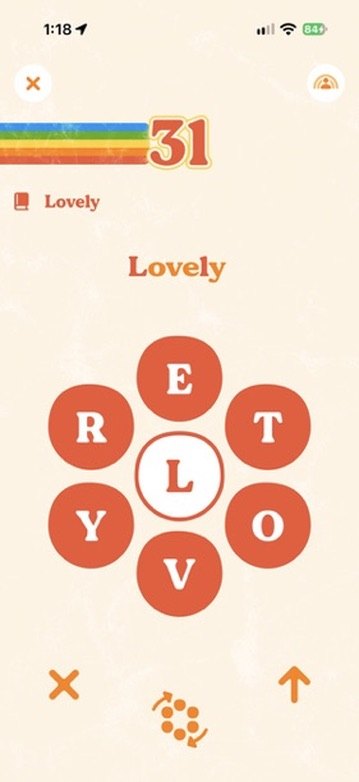
Spellotron

The app consists of two core word games: Spellotron and Wordway.

Spellotron will feel familiar to anyone who’s played The New York Times’s Spelling Bee: You get seven letters, and form as many words as you can that are spelled with any combination of those letters — inclusive of the always-required center letter. The gameplay closely matches Spelling Bee, and that’s a good game, so that works out great.

Wordway feels like a new mechanic to me, and I’m a big fan. You see two words, one across the top of the grid, the other at the bottom. Your job is to form valid crosswords that extend from the top word to the bottom word — using only the letter tiles that those two words are composed of.

I want to be better at Wordway than I am, but I enjoy playing it even when I’m flailing a bit. (I do better when I start from the bottom and work my way up, for whatever reason.)

You can play both of the games within Retrogram for free — but you only get today’s puzzles. Want the archive and all the puzzle packs? Subscribe for $30 a year or $5 per month.

News TiVo

TiVo will make automatically skipping ads a subscription service

How the mighty have fallen

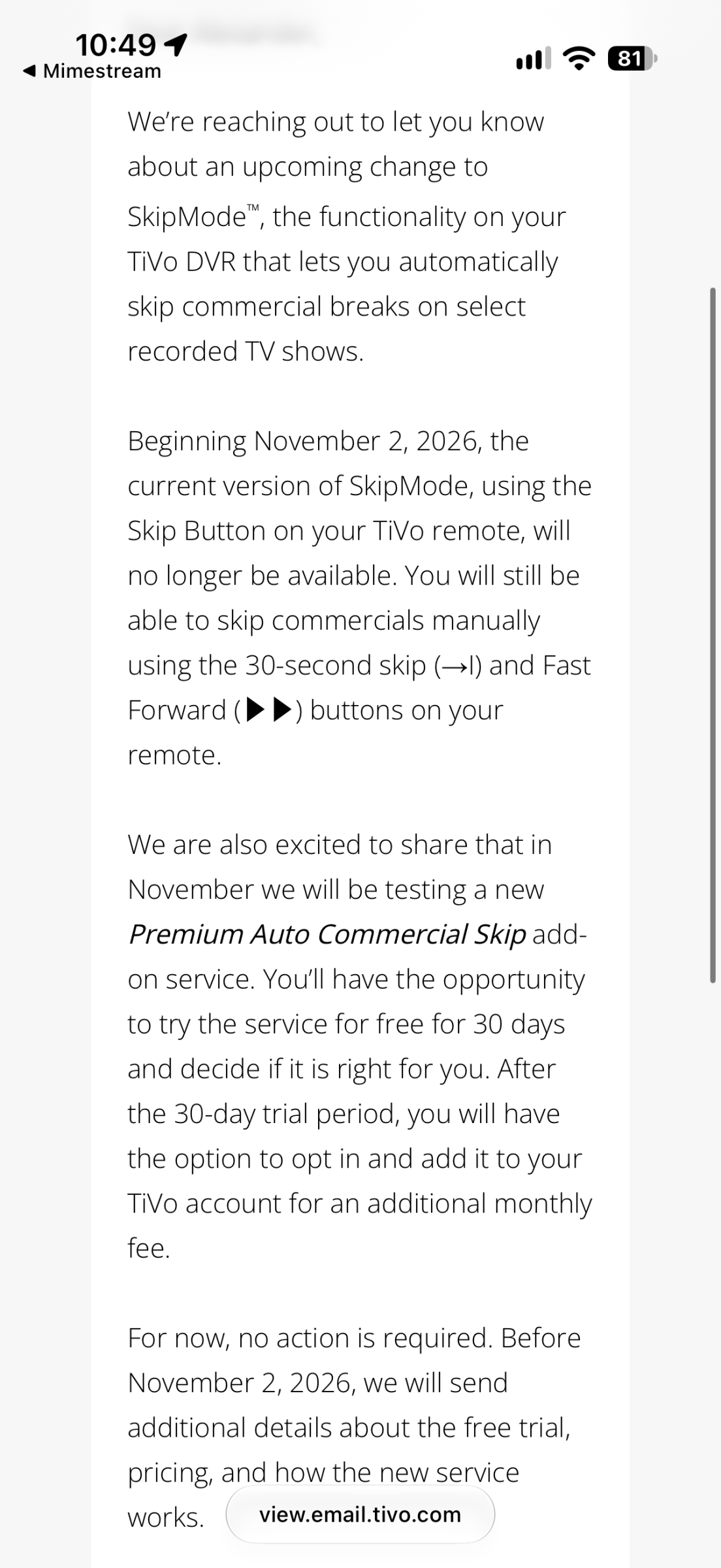
TiVo email: SkipMode's one-button skip ends Nov 2, 2026, replaced by a paid Premium Auto Commercial Skip add-on.

I haven’t been able to use my TiVo for years, after my cable company stopped supporting cable cards. Today comes news that TiVo — the once-great company that made DVRing a standard — is removing its one button ad break skip functionality in favor of a subscription service that lets you do the same thing, just for more money.

We are also excited to share that in November we will be testing a new Premium Auto Commercial Skip add-on service. You’ll have the opportunity to try the service for free for 30 days and decide if it is right for you. After the 30-day trial period, you will have the option to opt in and add it to your TiVo account for an additional monthly fee.

Wow.

Apps I Love Indie Developer Spotlight

Indie developer spotlight: Greg Pierce

Greg Pierce makes apps for nerds and power users — but also for everyone else.

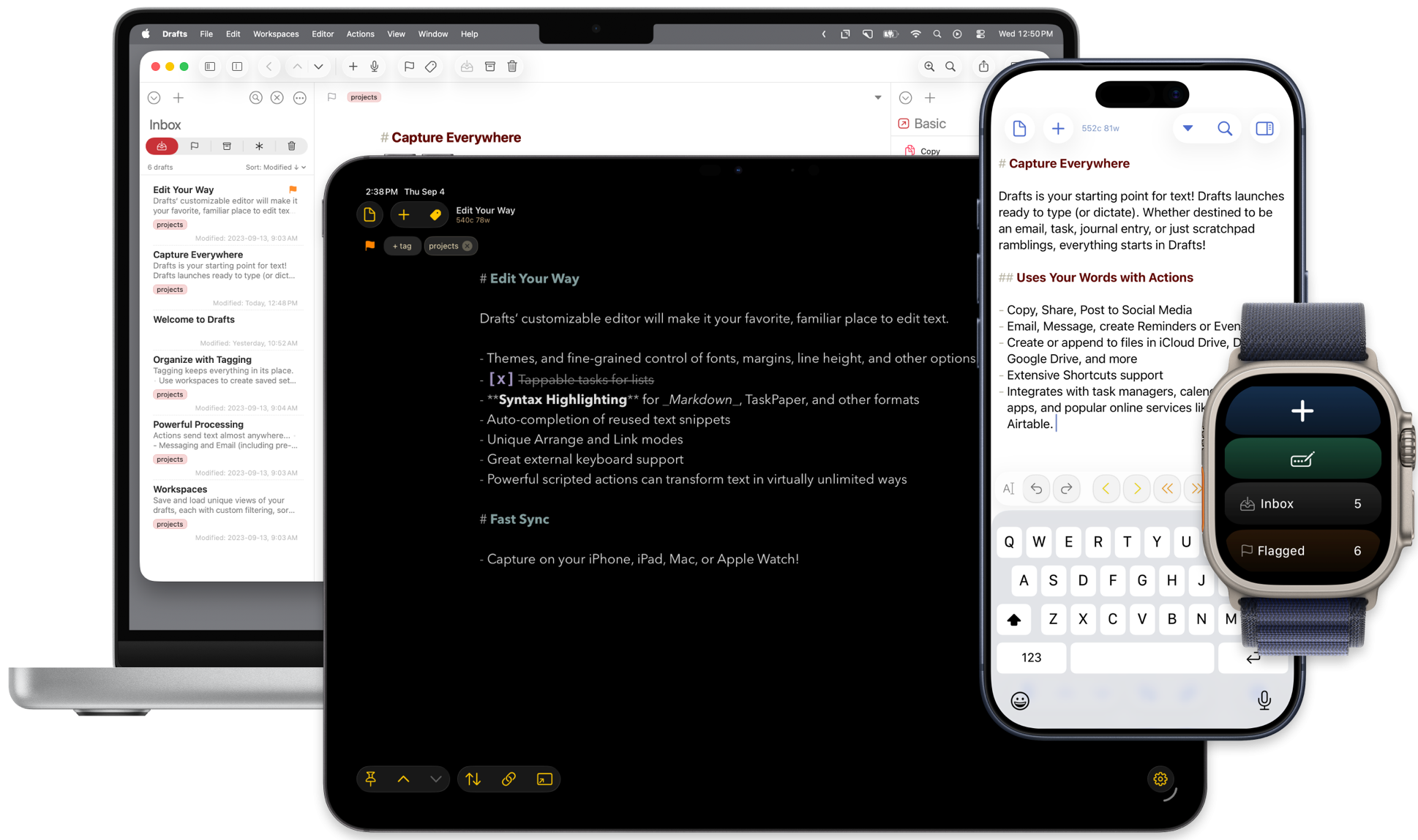
Drafts
Drafts — for everything.

Pierce is the developer behind Agile Tortoise, a name so good you might get shellshocked.

If you’ve spent any significant amount of time nerding out over iPhone automation, you’ve probably encountered Pierce’s work even if you didn’t realize it. He authored the original x-callback-url specification — after kicking the idea around with Marco Arment — which gave apps a standardized way to pass information back and forth via URLs. This was in 2011, years before Shortcuts existed.

But Pierce is better known for the apps he makes, and the big one is Drafts.

When I wrote about Drafts for Macworld 1000 years ago (specifically in 2012 and 2013), I loved it then. And it’s significantly better now.

You have some text. You don’t necessarily know what the text is yet.

Maybe it’s an email. Maybe it’s a text message. Maybe it’s a note. Maybe it belongs in Reminders. Maybe it’s the beginning of a blog post. Maybe it’s Maybelline.

Drafts doesn’t care. It just wants you to write it down first.

Open Drafts and you’re immediately looking at a blank page with the keyboard ready. You capture the thought, and only afterward decide where it goes. That’s the whole philosophy of the app: Get the text in first; figure out the destination later.

Drafts can send text all over the place, transform it, run actions on it, invoke Shortcuts, execute JavaScript, work with other apps and services, and generally become as ridiculously sophisticated as you want it to be. There’s an entire community built around sharing Drafts actions.

You can understand Drafts in about twelve seconds, but you could spend years getting better at using it.

Pierce makes several other apps, and there’s a nice thematic consistency to them. They take some small task that computers tend to make more complicated than necessary — and they aggressively remove the crap from the process.

Tally is for counting things. That’s it! You tap to count up. Swipe down to count down.

Terminology is Pierce’s dictionary and thesaurus app, except describing it that way undersells it. Pierce calls it “a browser for the English language,” which is exactly right. You can move between definitions, synonyms, antonyms, related words, more- and less-specific terms, and then jump outward to other reference sources.

Then there’s Simple Scan, which is exactly what it says it is: a simple way to scan. Scan your document with your iPhone’s camera, get a searchable PDF, and send it somewhere.

There’s a common thread through Agile Tortoise’s apps. They start with very small ideas: capture this text, count this thing, look up this word, scan this page. Then Pierce works to keep things simple on the surface, with tons of hardcore features under the hood for the adventurously nerdy.