There are folks who use “vibe-coded” as an insult. This app was vibe-coded in a weekend. And those folks are also unhappy, I’m certain, that here’s another article about AI.
I get it. But AI-assisted coding doesn’t mean developers don’t give their creations real care, and love, and attention. How something was made doesn’t tell you whether it’s any good.
I have many, many thoughts on how empowering AI-assisted coding can be. But today I want to talk about a specific category of app that exists only because of tools like Claude Code and ChatGPT Codex. These are apps that are empowering people to get more out of their devices. More specifically, these are apps with just a single user.
I put out a call for vibe-coded apps folks had made to solve specific issues of their own. And I got back a slew of messages with fascinating apps — weird, specific, deeply personal tools that each solve exactly one person’s issue.
One reader, Chris, put it well: We’re now in the age of bespoke personal apps. Here are a bunch of them, loosely sorted by the itch they scratch.
The dog-poop finder
I have to start here. This app puts the “app” in “crapp.”
Tucker has a dog. Tucker also has a lawn. And as anyone with both of those things knows, the lawn and the dog have an ongoing… arrangement.
Here’s Tucker’s problem: He’s mowing. He spots a pile of dog poop. He’s not going to stop the mower, walk to the garage, grab a bag, and deal with it right then. He’ll remember where it is. He’ll come back later. Except, of course, he won’t remember where it is. That’s a crappy problem.
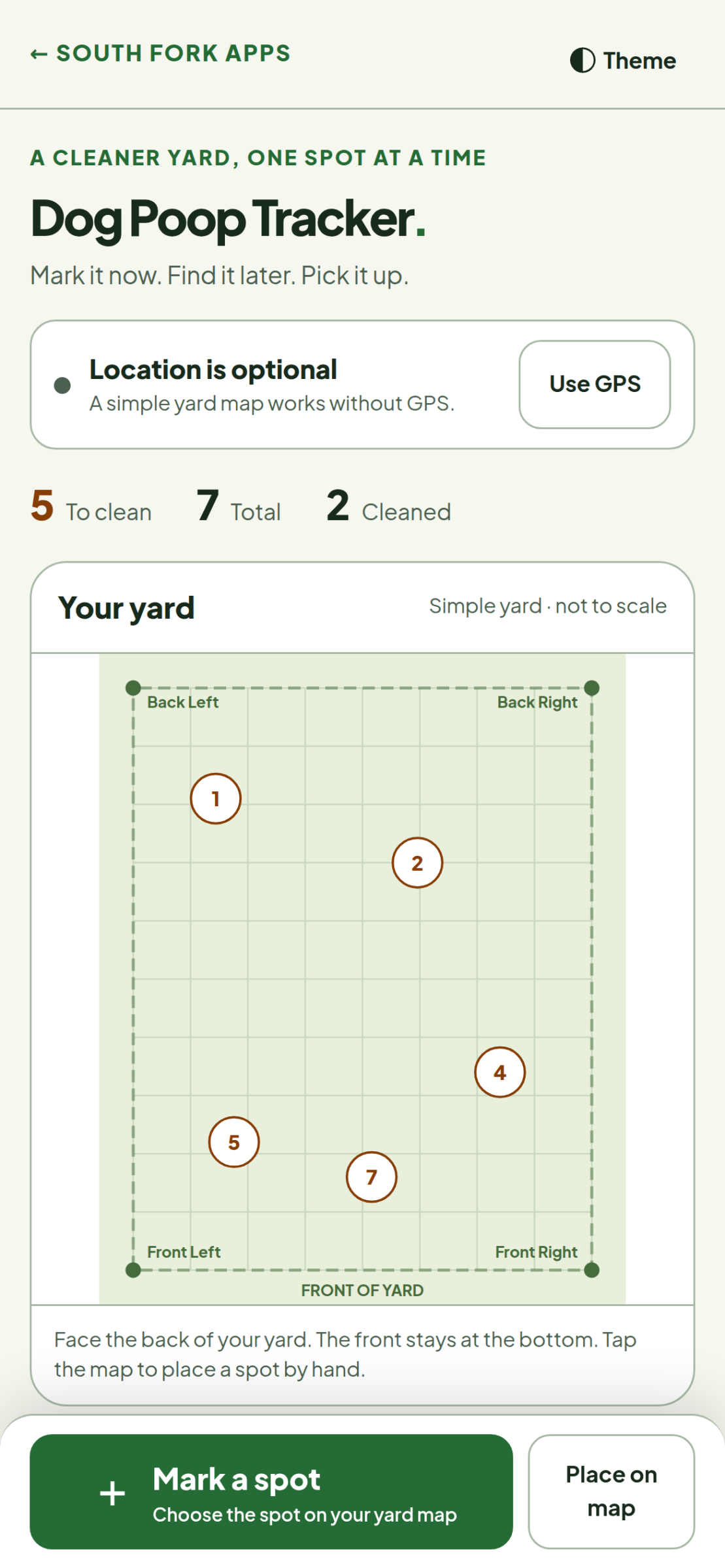
So Tucker built an app for it. When you spot the offending deposit mid-mow, you tap to drop a GPS pin right where you’re standing, and you keep mowing. Later, when you’re mower-free and properly equipped, the app shows you every pin on a map of your yard, and you check them off as you clean up.
It’s called Dog Poop Tracker, and its tagline tells you everything: “Mark it now. Find it later. Pick it up.” It’s a web app, so it runs right in your phone’s browser, and all of your data — such as it is — stays on your device. And because phone GPS can be off by several feet, which matters a great deal in this particular line of work, you can skip the GPS entirely and place spots by hand on a simple map of your yard.
Is this the most glamorous use of artificial intelligence? Reader, it is not. Is it useful as hell? Yes.
Nobody at a big company was ever going to build this. It took one guy, one dog, and one too many unpleasant surprises underfoot. It’s a number one app to Tucker. It’s a number two app to everyone.
Tracking what matters, and nothing else
Dogs came up more than once.
Chris’s wife is a college administrator, and she doesn’t use AI. The two of them had been going back and forth about AI disrupting higher education, so to make a point, Chris suggested they find a real problem and attempt to vibe-code a solution together.
The problem they chose: the weekly calendar and Google spreadsheet they’d been using to track their dog’s weight and calorie intake. They wrote a prompt together, let it run, and — to Chris’s wife’s amazement — got basically what she wanted on the first try. Chris has kept polishing it since, and they’ve been using a TestFlight build for a couple of weeks.
Andrew’s tracking is for himself, and the stakes are higher. He builds apps because the ones on the market are too heavy, too ugly, or do too much.
Andrew was recently diagnosed with a rare kidney disease, on top of celiac disease, so he needs to keep an eye on his weight, blood pressure, and sodium. His Wyze smart scale has what he describes as a terrible app, so he built one that just pulls his weight from the scale’s API. A second app gathers the kidney-relevant numbers from Apple Health, so he can track exactly what matters and export everything for his nephrologist.
Then there’s his meal planner. He uploads a recipe PDF (from NYT Cooking, say), a lightweight Claude model parses it and applies his dietary constraints and preferences, and out comes a week of meals. Importing a recipe costs him about a penny. There’s no cruft, and there are no features he doesn’t need.
Goodbye, subscription
A surprising number of personal vibe-coded apps exist because somebody looked at a monthly fee and thought, I’d rather not.
Adam uses Google Calendar at his new job, and needed his personal calendar’s busy times to show up in his work availability. Plenty of services will do that for you — Reclaim, Calendly, CalendarBridge — for what he calls outrageous prices, and in exchange for your calendar data. Kinda gross, he says.
So Adam used Claude Code to build a tool he called iSync, a simple Mac app that reads his iCloud calendars through EventKit and syncs a generic “busy” block to a Cloudflare Worker, which creates a matching event on his work calendar. No public ICS feed, no handing a calendar to a third party, no personal events accidentally leaking into work. It costs him nothing to run, and it’s entirely private. When he discovered that Shortcuts can’t trigger a Focus mode from a calendar event, he just added that to iSync, too. Adam knows enough about EventKit and Workers to know that the code is decent. He just never would have bothered before.
Aaron, a professional iOS and Mac developer, built Invoicy — a Mac app for time tracking and invoicing, now on GitHub — after Harvest jacked up its prices. He’s also building a music player that plays albums off tiny SD cards, automatically, like a record player; the Mac app that generates those albums and writes them to the cards is already done.
Aaron’s feelings about all this are, shall we say, mixed. He’s excited, but he also says he wouldn’t mind if he could magic LLMs out of existence. I get it. But I’m glad he can’t.
Movies, GIFs, and reading, your way
Scott has been a front-end web developer for more than 20 years. He just doesn’t do it for fun. For fun, he builds models and watches movies.
He’d been tracking movies in Airtable until he blew past the free tier’s record limit. He started building a replacement last winter, then stalled; there was too much backend stuff to learn, and not enough spare time to learn it. A couple of months ago, he started using Claude, and he’s since launched his Movielist app. For himself.
Why not just use Letterboxd? Because Letterboxd is about sharing, and ratings, and other people. Scott just wants to know what he wants to see and what he’s already seen. Will it become a real product someday? He doesn’t know. He’s just enjoying building it with Claude in between actual work things. Which, for what it’s worth, is how a lot of great indie apps got started.
Jay admits he’s probably built the same meeting recorder and transcriber as everyone else. But his favorite is something he calls Movie Memes. Feed it the video file of a whole movie, and it uses Whisper to pull out all the dialogue. Then he can make the exact reaction GIF he wants, captioned with the actual line from the movie — or with his own text.
Michael built an offline client for Readwise Reader. It has a fully local database, easy saving and printing in a bunch of formats, and, most recently, tag suggestions based on the tagging system he already uses. His library stays organized the way he organizes it, not the way some algorithm thinks he should.
For the kids (and the fediverse)
Adrian dabbled in iOS development years ago, but never got proficient enough to stick with it; his day job as a product manager let him scratch the itch vicariously. Now he’s making apps on his own with AI tools. Bagtag writes images to small NFC-powered e-ink keychains for his kids. He’s collected a pile of facts, jokes, and comics, and every day, he can beam something new to their tags. It’s a tiny, private, daily surprise. He has no plans to publish it. It’s for his family, and that’s it.
Adrian’s other project is more ambitious: Flightstead, a personal-website app and self-hosted server with fediverse publishing baked in. It’s free and open source, and he’s hoping it clears App Review soon. (Good luck, Adrian. I have thoughts.)
On the clock
Plenty of these vibe-coded apps are built for people’s work.
Tage teaches at a technical college. He built a coworker a locker-and-laptop checkout system. But his pride and joy is a lab system: All of his lab documents live in it, students follow the instructions and drop in their answers and screenshots as they go, and at the end, they download a finished Word document to turn in through the school’s learning management system. That’s real software, used by real students, solving a real headache. And a teacher built it himself, thanks to LLMs.
Chris, of dog-tracking fame, also built a better front end for a physics database he uses constantly for work, because he hates the official interface. Making better, custom versions of tools you use is a classic vibe-coding case for personal use.
David was making personal apps long before AI made it easy. Now, he says, the apps are significantly better. His roster: a budgeting app; an app that records raw camera feeds synced to presentation slide transitions; an app that uses machine learning to track a speaker’s pose and auto-crop video to follow them as they walk around the stage; a background process that sweeps simulator screen recordings off his desktop; and, of course, a Pomodoro timer.
The pros are doing it, too
You might think vibe coding is just for people who can’t code. Nope. Aaron, David, and Adam all know their way around a compiler. So do these two. (The more you know about coding, the better you can use these tools. I’ll have more to say on this in another article.)
Kevin has made so many web and iOS apps for himself that he’s lost count. Most are fun, dumb projects (his terms, not mine). A couple he uses every single day: a home-lab monitoring dashboard built specifically around his hardware, and an iOS app for tracking his physical media that, he says, actually follows Apple’s Human Interface Guidelines. Kevin is a product manager by day, and he credits that for how well it’s gone. He crafts intensely precise prompts and sets the tools to work.
Laurent used Claude Code to build himself an entire shelf of native Mac apps, and tuned his setup specifically so they’d look and feel like true (Mac-assed?) Mac apps. Three of them are just for him: Victor, a video converter and track extractor built on ffmpeg and MKVToolNix; Leon, which adds GPS coordinates to photos (JPEG and RAW) from a location track recorded at the same time; and SSL Toolkit, for everyday certificate wrangling. He’s published those and several others, in case anyone else finds them useful.
There are tons of apps for that, and this and that, and the other thing
Nick made a Mac app to help with his astrophotography projects.
Jann is modernizing Perl scripts he’s been running for more than 30 years, converting some to Objective-C in Xcode (“’cos I’m THAT guy”), translating Python scripts into Perl because he hates Python, and writing his own ffmpeg-based alternative to Handbrake, so he can rip Blu-rays with the Dolby Vision profiles Handbrake won’t handle.
Watson built a Mac app that does exactly one thing — it locks the keyboard so he can clean it — plus an Instagram link-sharing tool that strips the tracking junk off links coming and going.
And Jessie has built several tools for work and home, including a YouTube subscriptions web app and an apartment-watch dashboard.
And then there’s Carlos
Carlos, writing from Spain, apologized for sending me a wall of text. Carlos, I write stuff. Walls of text are a-okay.
Carlos has built more than ten tools, and those are just the ones he remembers offhand. Some highlights:
- autoclaude is a set of skills that turns Claude Code into a task queue. Drop tasks in an inbox, and it works through them one by one. When a session gets too long, it writes itself a summary and starts fresh. After each step, a second AI model reviews the code, and they keep going until both agree. He used it over the summer on a huge project for his main employer, and it can run for days.
- Autoclaude Runs is a Mac and iOS app for keeping tabs on all those autoclaude runs, so he can check progress — or hit the brakes — from anywhere. Yes, he built an app to watch the robot that builds his apps.
- teveport takes the HDMI output of his set-top box, captured on his computer, and streams it to his iPhone or iPad with no lag. He put an IR blaster next to the box, so he can change channels remotely, too. Live sports, anywhere in the house. (An earlier attempt, hlsViewer, had too much delay. Iteration!)
- espansoConfig is a friendly editor for espanso, the open-source text expander he switched to after getting tired of paying for TextExpander and Typinator subscriptions.
- OmadaWLANManager exists because he manages a lot of Omada wireless access points at work, and their web interface, in his words, sucks.
- claude-sync is a command-line tool that keeps his Claude setup in sync across three Macs.
- googleTrendsComparer helped him trace where an internet panic started, and tinyEvolution is a little web app for playing with evolutionary traits.
My favorite part of Carlos’s email, though, was his honesty about the ones that didn’t stick. He built a reminders app inspired by Marco Arment’s Unforgetful — and then Marco kept adding good features faster than Carlos could keep up, so he gave up and just used Unforgetful. He built spaceSwitcher, a Mac Spaces manager, used it heavily for two weeks, came back from summer break, and never got back into it. It still sits in his menu bar, unused.
He says there are about ten more projects he never finished. (For the record, I have four that I’d consider “still in development.”)
Small software
None of these people set out to disrupt anything. They wanted a list of movies, a healthier kidney, a healthy dog, entertainment for their kids, or a lawn that they could walk across barefoot.
For decades, if the software you needed didn’t exist, you had three options: Learn to code, pay someone, or live without it. Now there’s a fourth option, and people are taking it. They’re not building the next big thing. They’re building the next small thing, for themselves. Sometimes they abandon it two weeks later. That’s allowed, too.
Vibe-coded doesn’t mean subpar. It doesn’t mean bad. And in all these cases, it means empowerment. Computers are meant to help us customize our workflows to the ways we work. LLMs make that more possible than ever.