A LEGO collection manager and a git worktree command center, from the same one-person shop
Jared Sorge makes two apps that have absolutely nothing to do with each other, but that both clearly speak to things he’s passionate about. The best apps are the ones whose developers are passionate about them.
Jared builds an app for tracking your LEGO collection, and another for developers who juggle a lot of git branches at once. I tried hard to find a through line for these two apps. I landed on this: They’re about building things, brick by brick.
Jared has been building for Apple’s platforms for over ten years, and he’s been shipping his own stuff under the name Taphouse Software since 2015.
Baseplate is a LEGO collection manager for iPhone, iPad, Mac, and Vision Pro, and version 2.0 landed this week, timed to the release of iOS 27.
Baseplate was first released in 2024 by Shihab Mehboob, and Jared acquired it at the end of that year. He’d been, in his words, “pretty heavy into collecting and building” for a few years already, and he loves indie software, so when the chance to buy an app he was actually using came along, he took it. As you can imagine, I think this is awesome.
Version 2 is a full redesign that Jared built, reorganized around three tabs. Collections is your inventory: what you own, how many copies, what you’ve actually built versus what’s still in a box in the closet, and whatever notes you want to keep. Discover is for browsing themes and searching the catalog, where you get the stuff a LEGO nerd wants — piece counts, minifigures, theme, pricing. Radar is the wishlist, plus a feed of newly released and newly announced sets, which is either extremely useful or extremely dangerous depending on your level of LEGO self-control. And Baseplate syncs over iCloud, so you can manage your brick collection anywhere.
There’s also Brickify, which turns your own photos into images that look like they’re built out of bricks. It’s a toy. I like it.
Baseplate is free, and the free tier gets you ten sets in your collection and ten on your wishlist. That’s enough to find out whether you like it, and not enough for anyone who needs an app like this. Baseplate Pro removes the limits and unlocks iCloud sync and Brickify, at $3.99 a month or $24.99 a year.
Arborist
Arborist is a very different kind of app, aimed at a very different kind of person, and if you’re not a developer you can skip to the end. If you are a developer, and particularly if you’ve started leaning on git worktrees, stick around.
Quick primer for everyone else: A git worktree lets you have several checkouts of the same code repository sitting in different folders on disk at the same time. You can be halfway through a feature in one, reviewing somebody’s pull request in another, and running a long build in a third, without stashing anything or switching branches.
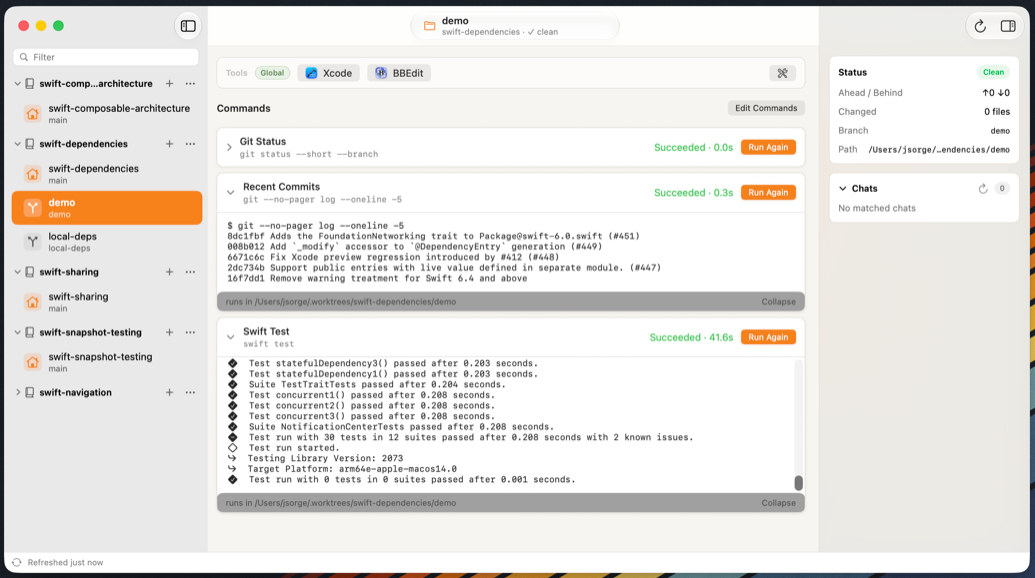
The problem is that git’s own worktree commands are fine, but the moment you have several of them, you lose track of which folder is which branch and which terminal window is pointed where. Arborist is Jared’s answer: a native Mac app that’s a command center for your repositories and their worktrees.
Add a repo and it finds every linked worktree automatically. You create a branch or check out an existing one from inside the app, with filtering so you’re not scrolling a list of four hundred branches. It runs your project’s tasks — Make, mise, justfile, npm scripts — right from whichever checkout you’ve selected, and it picks up changes to those task definitions live. It opens your editor, your terminal, and your other tools already pointed at the correct worktree.
Arborist will also resume your Claude Code and Codex conversations tied to a given worktree. It finds them locally, privately, on your own machine.
Arborist requires macOS 15 or later. It’s $39. Not $39 a year — $39, one time, covering every version 1 update, with a 14-day free trial. Jared considered making it a subscription and decided against it, writing that he settled on a one-time purchase “just like the Software Days of Yore.” I’ve written before about how I don’t think subscriptions are automatically the villain, and I stand by that. But I also love when I can own an app outright forever.
The common thread, after all
I said at the top that Jared’s apps are for builders. I think that’s right. They’re also for people who keep track of things meticulously. A LEGO collection is a pile of stuff you want to see organized. A directory full of worktrees is *also *a pile of stuff you want to see organized. Baseplate and Arborist are both, underneath, focused on precisely that: a thoughtful view of a mess you made with intention, arranged so you can find what you need.